Showing posts with label security. Show all posts

Saturday, April 25, 2009

Bonus Security Credit for Google Chrome’s Strange Install

Last fall, many folks including myself commented about Google Chrome’s unusual install behavior. Our best guess at the time was that it represented an attempt to accelerate adoption, by allowing non-administrative users to install Chrome.

It also allowed lower-privileged domain users in corporate environments to install and use Chrome unless their IT specifically blocked it.

With this recent Chrome vulnerability and rapid patch cycle, though, I’ve come to see the install in a new light.

Firefox requires an admin to initialize an update. This can be done through programmatic remote admin or right on the console, but still requires intervention. IE can be updated via Windows auto-update, but if auto-update isn’t set to run or if a specific patch needs to be applied, it requires intervention. Chrome, on the other hand, will update itself on the fly for each user’s install (it does require a restart, but only of the Chrome app) unless the installer is cracked to remove the GoogleUpdater component.

Given the cost of having an out-of-date browser version versus the risk of having Chrome updated without admin knowledge … I have to say I like this approach.

Tuesday, April 14, 2009

Facebook “Private” RSS Feeds Probably Don’t Leach Data…

Last year I experimented with private group microblogging systems via authenticated feeds. Didn’t go anywhere, because many of the biggest newsreaders don’t properly support authenticated feeds. And “obscure but public” feeds get indexed by aggregators like Bloglines, by design, making sensitive content much less obscure.

Enter feed access control, a several- (3-?) year-old RSS/ATOM extension that tells Bloglines, and anyone else who is listening, that this feed should be treated as private, even though it’s public.

Facebook’s feeds are intended to support this protocol:

fb

Which seems reasonable enough.

There are a couple of issues though. First, this approach is based on a third-party’s positive action to prevent or “opt-out” of publishing and indexing, in a system that normally defaults to syndication, indexing, etc. So it’s easier for a glitch to expose data.

Second, the whole “fac” extension is a gentlemen’s agreement among parties that couldn’t even agree on making authenticated feeds work well. Perhaps they all make a best effort to isolate the marked content. But tomorrow, a startup with a rocking aggregator could simply ignore “fac” and expose all of the feeds it has.

In some sense, the same vulnerability exists with other systems – if you signed up with some random webmail provider, who’s to say they don’t expose your mail. But because RSS is public by nature, almost all feeds live utterly unprotected, and this extension is one vendor’s hack, it’s not quite the same.

All in all, probably not a big reason for concern. But when people tell me how private things can be on facebook (where you can sneeze and end up revealing your data because the IxD is tilted so heavily toward sharing everything) it always seems worth noting how your data (via your friends’ feed subscriptions) can slowly leach out into the open ocean of the indexed net.

Friday, March 27, 2009

Harm Reduction in Windows 7

Guest mode … kid mode … whatever you want to call it, is brilliant.

But more than that, it’s an interesting admission that (1) you can’t fight the power of the darknet and (2) you might as well empower people to behave in a way that minimizes the damage, whether or not you approve of what they’re doing.

If I had a dollar for every individual who ever swore they never go near warez or pr0n or questionable media downloads, and ended up with a mucked up machine … or worse, a machine that transmits their passwords and SSN to a bad guy …

Even with an older OS, like XP, one can achieve a fair degree of isolation and protection by using a patched up Firefox or Chrome on top of a plain user (not admin) account. There are still holes by design; e.g., a user could fill up the hard drive or install software that persists in certain places. And I’m sure there are serious security flaws that allow code downloaded as user to escalate itself to admin … perhaps even coming from a “drive-by” Javascript source via Firefox/Chrome … but such threats seem to be pretty darned rare if everything is patched up and prophylactic protections are applied (e.g. Spyware S&D’s “immunization”).

Guest mode (and IE 8 “In Private” browsing) appears to close many of the remaining holes.

What we need now is an education campaign to convince people to segregate their online activities. But besides not knowing how to create these low-privilege accounts, a lot of people I know refuse to admit they ever visit the darknet. Or the visits are rare and they “hope for the best.”

Let’s pre-configure – by default -- a second account for ever power user (or admin) on a machine. At login time, offer the guest (more protected) account along with some description of when it might be a good idea to use it.

I’m not sure the best way to label the buttons, because it’s a bit hard to explain how the more secure, more protected mode is paradoxically for the more anonymous, more dangerous behavior; while the “less protected” mode is for normal operation which might involve vital personal data. I’ll let the UX wizards sort this part out.

Thursday, September 04, 2008

Citibank Needs to Get Their PKI Act Together

While I'm thinking about security ... there has been plenty of debate over whether Firefox 3's hostility toward self-signed certs is a good idea.

Either way, this should be a non-issue in the banking world, which ought to have proper certs on any public facing machines.

So I was more than a little surprised when I went through a workflow with Citi, where a number of links, widgets, etc., triggered the Firefox self-signed-cert blockade/warning. The problem resources were loading from subdomains like foo.citibank.com or bar.citimortgage.com.

When I did some work with [insert other extremely large bank here], everything was SSL, even internal web service and app communications, and usually (not for external customers) mutual authentication. The bank had an entire PKI department, which controlled numerous separate CAs corresponding to dev, test, production, different business units/functions, etc.

Hooking up to most things meant sorting out the right kind of cert to present, and working the proper cert chain for whatever the server gave you. In some situations -- e.g., programmatically sorting this out in Java -- it was a major hassle. Not to mention that the PKI group was cooperative but busy, so there could be delays. And the certs were set to expire in not-so-long, so a whole mechanism was necessary to make sure you didn't have system failures in your department due to not getting a new cert placed in time.

It would have been much easier to use self-signed certs all over the place, but the bank wanted some extra protection even against rogue calls from inside the network. The policy made sense and, even if it didn't to you, your alternative was to box up your stuff and leave the building.

Of course intentionally deploying a production service to external customers with a bogus cert was so unimaginable it wouldn't have even been funny ... in order to be funny there would've had to have been some molecule of possibility in it, and there wasn't.

Can Citibank really not have controls that prevent this?

Chrome's Unusual Installation Location: Good, Bad, or Ugly?

I -- and many other folks -- have noticed that Google Chrome installs only for a single user, and does so in a way that does not require administrative privileges to run the installer.

Basically, it just drops its files into a subdirectory of the user's home directory, places its shortcuts in the user's specific Start Menu folder, Desktop folder, etc., and arranges for its GoogleUpdate.exe helper app to launch from Windows/CurrentVersion/Run under HKEY_CURRENT_USER, rather than HKEY_LOCAL_MACHINE.

This is an unusual pattern for a Windows installer, almost certainly rigged in order to allow minimal-privilege user accounts on corporate networks to install and run Chrome ... under the radar of IT or management policy, if need be.

The question is whether this is inherently a security problem.

On one hand, I've read posts pointing out that this setup leaves the executable vulnerable to other executables that run with the user's permissions. This means another app could replace Chrome with a compromised Chrome, and the user would never know. At the same time, if Chrome can install, then any other malware could install itself the same way -- set itself up to launch under HKCU/.../CurrentVersion/Run, and sit in the background doing anything it wanted (like listen to keystrokes for another HWND). Then again, being in the user's browser might make snarfing credentials and scripting their use (or taking advantage of an auth cookie being present) a lot easier. The point is that a traditional executable under Program Files should be less vulnerable -- a nonprivileged user account can't rewrite those files.

On the other hand ... this is not terribly unlike the install/run routine on *nix servers. If I'm a "regular" user, I'm not installing to /usr/bin, I'm just untarring in a local directory, possibly building, and then running the binary. Of course a user doing this is likely more sophisticated than general Windows users, and fewer *nix end users means less malware at the moment.

Wednesday, September 03, 2008

Always-On JavaScript Mildly Disturbing

Google Chrome doesn't have a switch to turn off or restrict scripts. While this might be an upcoming feature, my guess is that Chrome is about "running" web 2.0 apps, and so JavaScript is considered essential.

Well, maybe that's ok if the security model around JavaScript execution is as fantastic as the comic book suggests.

On the other hand, the launch of this browser featuring a well-known security flaw (admittedly not a JavaScript flaw) makes me a less comfortable about always-100% script execution.

Friday, June 20, 2008

Want to Read Your Parents' / Boss' / Coworkers' Files? Mozy Client Circumvents Windows File Access Permissions

Last fall I wrote about Mozy, a cloud-backup company (now owned by EMC), which had a severe bug: it didn't back up all the files it was scheduled to. What was most disturbing was not that they hadn't caught the bug ... it's that when I tried to work with them to resolve it, they blew me off. Apparently I wasn't the only one to have this problem either, as people from all over found my blog post and emailed me, saying they saw the same behavior and asking if I had a fix.

I still think that not backing up files is the biggest possible bug for a backup program.

But now there's competition: their latest client allows a non-privileged user on a Windows XP system (haven't tried it on Vista yet) to restore private files belonging to any other user ... including Administrators, and place the "restored" files into the non-privileged user's folders, with full access, and fully decrypted.

How does this work? Say Jim, the Admin on the box, installs Mozy in a default configuration. Mozy is backing up Jim's "My Documents" folder and subfolders, among various other things. Jim's son Lenny, who is a non-privileged XP user and who is not supposed to have access to Jim's private files logs on.

Lenny notices that "My Computer" contains a virtual drive corresponding to the Mozy backup set. In that virtual drive is ... a "C:" drive ... and a "Documents and Settings" folder ... and a "Jim" folder. Now in XP, "C:\Documents and Settings\Jim" is another name for Jim's "My Documents" folder. This particular instance though is not the actual "C:\Documents and Settings\Jim", which Lenny doesn't have any access rights to, but the backup image of the folder.

So Lenny browses through, finds something interesting, right clicks and chooses "Restore To," which lets him "restore" his dad's file to somewhere of his choosing. He browses to his Desktop, clicks ok, waits a few seconds, and now he has the file.

(Even if Jim has chosen to manage his own crypto key -- one of Mozy's coolest features -- the Mozy client keeps that key accessible so that it can perform automated backups. Unfortunately, it also uses the key for restore operations no matter who performs the restore ... so files restored in this way are decrypted.)

Ok, so there are no secrets on the family computer. Not the biggest surprise, since if junior really wants the data, there are tons of other ways to get it, from booting a Live CD and mounting the hard disk, to yanking the hard drive right out of the box.

But here's where it gets more interesting: In many (most? ... all that I've worked at anyway) corporate, Active Directory- / Domain Controller- managed XP Pro deployments, folks can log on to each others' workstations at will, provided they use their own credentials in the Domain. Their Domain profile updates to the local machine as necessary, and they can then work there. They may even be able to log in remotely via Remote Desktop.

So at work, I walk up to my co-worker's machine (or maybe RDP in) and log in as myself. I open the Mozy tray icon, and proceed to restore their files from the backup set to my own directory, or to an unprotected area like C:\Temp. From there I can open/read/copy these files however I like. Incidentally, if my boss' files weren't already scheduled to back up, I can add them to the backup set. Next time the backup runs, they'll show up in my view of the "Virtual/Restore Drive."

I haven't tested the Mozy "Pro" business client, but since the docs [PDF] look identical to the Home client (apart from a color accent) I suspect it behaves exactly the same way (see in particular sections 7.3 "Using the MozyPro Virtual Drive" and 7.4 "Right-Click Restores") Not to mention that if Mozy fixed this in the Pro edition I can't think of any reason they'd intentionally keep a broken code fork for the Home edition.

I think there are some other fun tricks one could play with this client too, but it all boils down to two things:

  1. The underlying process is a privileged process, but it takes orders from a client run by any user.(I'm no security guru, but this sounds like a Confused Deputy problem to me.)
  2. The full fidelity of the local file (including a way to associate ownership and permissions) is not being preserved through the backup round trip.

I'd have reported it to Mozy before writing about it here, but they made their lack of interest clear last time around.

Update: I forgot to mention, MozyPro offers "Network share and mapped drive support" ... combined with the bug described here, that's some serious potential risk to add to the mix.

Saturday, April 26, 2008

DVD Flick Installer Needs to Rewrite a System Library Why?

I feel bad ripping one in the crew that builds DVD Flick, a well regarded open source tool. From what I can tell, this is a fully-open, Sourceforge-hosted, quick-authoring tool similar to the excellent ConvertXToDVD.

During its installation, though, it attempts to overwrite the richtx32.ocx file in the windows/system32 directory. Richtx32.ocx is a Microsoft-authored GUI widget component (an AcitveX library) present in all or most Windows systems.

Trying to overwrite this is bad on so many levels. Who knows which version of this lib is being supplied by DVD Flick? The installer definitely doesn't compare versions and make an intelligent choice, or it would have chosen not to even try on my systems, where everything is up to date. So it's an old version, maybe one with bugs or security vulnerabilities, that could compromise my system because any process might load this code up.

Not to mention it appears to the user that the app needs to alter their system in order to continue. Since they trust this app (it's been written up in blogs like LifeHacker), they start thinking "oh, sometimes free apps I download off the Internet need to overwrite my system libraries, no big deal" ... all the UAC in the world won't be able to overcome that mentality (although theoretically Vista has other protections to remedy this specific problem).

I tried to think of any justification for this behavior, but I couldn't. True, there are aspects of the ActiveX/Registry/DLL Hell problem that can make something like this a little tricky, but there are workarounds as well.

Starting with the easiest fix: include a legit Microsoft merge module containing the latest DLL version, and first, in the installer script, check the installed lib version/signature to see if it's necessary to install a new one at all.

The other possibility, that DVD Flick isn't trying to update this library, but needs to install its own version on top of the existing one, with some extended functionality, would be even more ridiculous... I entertained this idea for a moment, but it appears not to be the case.

Thursday, February 14, 2008

Path of Least Resistance == Most Rails Apps Send Your Password In the Clear

The bulk of developers will follow the gradient down hill, even many of the ones who think they're rebels (I'm pretty sure this scene from Life of Brian was about Steve Jobs and the cult of iConform).

Too bad for them, right? Well, no. Too bad for us as a software industry with a reputation for troubled delivery. And too bad for us as citizens and consumers, who suffer from bad software not only in dramatic ways but in having our private data (passwords, SSNs, etc.) sprayed all over.

Elegant and minimalist principles are great; still, if you give most software developers a knife without a sheath, it's only a matter of time before the blood starts flowing from somewhere.

I was surprised when I realized that Rails has no built-in authentication module; more surprised when AWDR "teaches" you to roll your own authentication; and most surprised when I realized that acts_as_authenticated (nice, but intentionally not sophisticated) is de facto standard for auth in Rails.

Hmmm... I wonder how many of those Rails sites I use all the time actually bother to protect my credentials? If the originating or following page isn't kept in SSL, you can't tell by looking for the little "lock icon," but you can tell be having a look at where those login forms are posting to.

I looked at the first two pages (24 apps) on happycodr.com, a site that claims to be "the unambiguous showcase for sites designed with Ruby on Rails," and which is linked directly off of the Apps page at rubyonrails.org.

Eight of these sites are content-only and don't offer logins. Of the remaining 16, fully 12 send their passwords in the clear. Two of the four which don't are AOL properties, required by AOL to use a combination of AOL SNS or OpenID, and SSL.

Of the 14 Rails sites built by non-AOL companies and taking a password, 12 (85%) just send all their users' passwords in the clear.

Some of these organizations think that because their services may not contain sensitive data, it doesn't matter. But most people use a very limited set of passwords (or just one!) for all online sites. When someone keys a password into a site I build, I protect it because I assume that is also their online banking password, or their email password, etc.

To be fair, it is no secret that HTML forms are vulnerable in transmission, and many Rails resources point out that the easiest solution to this is to employ SSL. But clearly the message is falling on deaf ears.

And these developers aren't even trying to cleverly roll-their-own system. They're not hashing the username/password on the client (vulnerable to MITM, replay, impersonation, and other problems but better than nothing); they're not using a nonce and hashing (still broken but better). They may not even realize there's a problem.

To be fair to Rails, it's not the only platform in this fix. I was stunned when Microsoft rolled out a nice set of prebuilt User/Role/Profile/Login components in ASP.Net 2.0, without building any security in. I figured these widgets would get dropped into a lot of sites without a second thought.

It's a little "wider" issue for Rails, though, because, Microsoft has been strong in enterprise development where there are IT departments and policies that may wedge SSL in there before an app makes it to production. Whereas Rails is used more widely in smaller organizations where there is not likely to be anyone with the authority to impose security on a development team.

For ASP.Net, where many developers never look under the hood of the components, and both the client-side script and server-side post-back handling is accessible inside the ASP.Net stack, I would recommend loading the login widget with the best possible pseudo-security using JavaScript crypto for non-SSL scenarios, and then still requiring the developer to actively add a web.config setting to allow running in non-SSL mode. This has the added benefit that, when the app is moved to a production environment for the first time, with a new web.config, the error will pop up again as a reminder right at deployment time.

For Rails, things are a little more complicated. It's going to come down to better educating, and perhaps a little more structured thinking about what I call the "application model" (not platform nor architecture). Which I will write about next time.

A Couple of Tiny Rails SSL Helpers

Here are a couple of helper methods for ensuring forms are set to submit via https in the production environment (but not in dev), and for redirecting back out of SSL afterward. Since SSL can be resource intensive on the server, it's usually good to hop back out into cleartext unless the nature of the application (e.g., financials) warrants encrypting the whole session.

To create a form that uses, SSL, just replace form_tag with form_tag_using_SSL_in_production.

In application_helper.rb:

def production?
ENV["RAILS_ENV"]=='production'
end

def form_tag_using_SSL_in_production form_args, &block
form_args[:protocol], form_args[:only_path] = 'https', false if production?
form_tag form_args, &block
end

form_for is the preferred helper ... if it's actually a "form for" a model object, which this one was not. I'll leave the analogous form_for_using_SSL... as an exercise for the reader.

When you're done with the relevant action processing, any content rendered is going to get sent back under the SSL connection. At some point (in my case, immediately) you want to redirect out of SSL. Just use redirect_and_drop_SSL the same way you would use redirect_to.
In application.rb:

def redirect_and_drop_SSL destination
destination[:protocol], destination[:only_path] = 'http', false if request.ssl?
redirect_to(destination)
end

You might be thinking this stuff is too trivial to post about, and anyone who needs to use SSL knows this stuff already. Unfortunately, that's not entirely the case, as I'll write about in my next post.

Wednesday, January 09, 2008

Rails Hack: Combining Acts_As_Auth with Long-Lasting Anonymous Sessions

In one of my Rails apps, I have two kinds of users: anonymous visitors, who do not have to sign up at all to use the app's functionality, and "vendor" users, who need to sign up and create some content in order to get value from the site.

The requirement for sessions was simple:

Anonymous visitors should have a session that persists for a long time (e.g., months) via a cookie. Since there is no information at all collected from these visitors, there is no reason to clear them out of the browser, and they would appreciate the convenience of being able to pick up where they left off when they come back.

Vendor users, however, have more data at stake, and so should have the typical login/password/remember-me?/logout pattern, allowing them to decide if their sign-in should persist, and letting them explicitly logout to kill their authentication.

I dropped in acts_as_authenticated, and it does a fine job with the second case (vendors). For the first case, I then added sliding_sessions, which is elegant and has now been added to the relevant wiki page.

The problem is: once session cookie durations are extended in general (at the application or controller level), aaa's authenticated users will be "remembered" upon return to the site, whether they want to be or not -- because their user info is already in their session (i.e., the "login from cookie" is not necessary and is never called). Timing out a session/auth on the server side is a good practice, but doesn't solve this issue -- if the user closes the browser and walks away, someone might come up right behind them and come back to the site, where the session/auth has not timed out.

Here's my solution. It seemed quick and easy; if anyone has criticism or improvements, let me know:

There are three cases -- anonymous user; vendor asking to be "remembered"; and vendor not asking to be "remembered" -- of which the first two worked fine. So I add a cookie upon login, set to timeout at the end of the current session, which will help me separate out the third case.

The details:

AAA adds a couple of "account controller" actions to your app. In login, I added the new cookie (see line 11). Then, in application.rb, I added this method as a before_filter. It checks to see whether you are an authenticated user (i.e., not an anonymous visitor). If so, it resets the session unless it sees the vendor cookie (meaning you've signed in in this browser session and so should not be cleared out yet regardless of "remember me" choice) or the auth_token cookie (created by aaa, and indicating the the "remember me" persistent login choice).

So if you authenticate and do not choose "remember me" then you have no auth_token cookie and, when you close the browser, you lose your vendor cookie. When you come back to the site, your session (and user info) are cleared.

Friday, December 07, 2007

MozyHome Backup Fails to Backup Designated Files

I have been testing out Mozy's MozyHome remote backup product, and have found that it sometimes ignores new or changed files in the backup set marked to be backed up. Sometimes it "discovers" these files (or changes) days or weeks later and backs them up; other times, if I modify a file "nearby" (relative to the way my backup set is constructed), it will suddenly discover all the other changed files and back them up. Still other times, no poking or prodding seems to make it back up these files.

This is a serious problem. After all, the raison d'être of the product is backup. Imagine that a home user or a business installs this solution, marks files to be backed up, observes that the backup process is running successfully and then -- after a data disaster -- learns that, well, some of the files are backed up and some simply are not.

If Mozy were a fly-by-night outfit, one might say that better due diligence is required in choosing a backup provider. But with its recent acquisition by storage giant EMC and its global contract with GE, Mozy appears to be a solid company.

The software, though not perfect, basically works. The backup and restore are straightforward. You can encrypt locally with your own key so that no one but you could ever decrypt your data in the case of a breach (although interestingly, the file names are not encrypted, so don't count on hiding the existence of my_illegal_off_balance_sheet_transactions.xls, or gifts_to_my_mistresses.doc).

But we're talking about the number one, sine qua non, only -- really -- important use case for backup. It has to back files up. Or at least, if it doesn't, it needs to tell you what failed, when, and why.

When I first discovered this problem, I realized that publicizing it could have a negative impact on Mozy's business. So instead of blogging, I contacted them directly to learn more. Unfortunately, after a few back-and-forths, including my running their diagnostic tools and sending them the reports and explaining that I was not going to give their support personnel full remote access to my box without more information, they have gone radio silent.

As a software engineer, I am fully aware that this problem could be a strange corner case. Perhaps it is so narrow that it never affects anyone besides me. But I doubt it. And, in any case, this problem is severe enough that it warrants a little investigation to determine its breadth.

Why do I doubt it is an unusual corner-case failure? Simply because my configuration of the service is so "typical." I'm running XP SP2, NTFS on a well-maintained, modern machine, on a secure home network behind NAT, with no strange services or applications of any kind running (e.g., the kind that might hook and hack kernel file system operations, or leverage alternate data streams). The affected files are not under unusually named file paths, or have any funky attributes set on them.

The only things I am doing that are not defaults are using my own encryption key, and adding a few files to my backup set that aren't in the "My Documents" tree. My conclusion is that it is likely that whatever glitch is causing the software to miss files on my file system, is also missing files on other people's file systems. And they have no idea.

Perhaps this problem doesn't affect other users -- but without trying to verify the bug, how can Mozy know? In my last email to them, I specifically asked if their QA team had even attempted to replicate the bug. Had they tried and failed to reproduce it? Fair enough, maybe I could offer some help. But if they haven't tried, it makes you wonder what bug report could possibly be a higher priority? Maybe if their app runs off the rails and reformats your drive, that's a higher priority. But barring active destruction of your data, or a major security bug that could compromise you to a third party, I can't think of anything.

The ultimate problem here is not even an engineering problem. Yes, there's a bug in the software, but there are bugs in almost all software. Rather, it's a process problem. How does the QA process work? How does customer support work? What steps do you take if someone reports the Really Big Bug? Is the right thing to assume they're a crackpot? Can you afford to do that and not even look into it? (Hint: No.)

</end of regular post> <free:bonus>

Since I'm really not out to get these guys, but ideally want to help, I'm gonna offer a free first step: it's really easy to tell after the fact if this bug is manifesting, since the set of files actually backed up simply doesn't match the local description of the backup sets. So an easy diagnostic is to write a list of these two sets of files and diff them. If there are deltas, you've got a problem.

So... you push out an update to the client that creates a list of the files in the active backup sets and sends it over to QA as the last step in the online backup process. Then QA just has to generate a matching file list (the match is on the account id [email address] and either the date/time or the id number of the backup) from the Mozy meta-data store and compare.

Tuesday, October 23, 2007

Clowns on Parade: Giving Administaff Your Keys Isn't Much Better Than Leaving the Door Open

Chains and their "weakest links" are used all the time in metaphor. But I realized this metaphor was wrong after seeing an odd "chain of locks" securing a no-vehicle gate last week near the GGNRA in Marin.
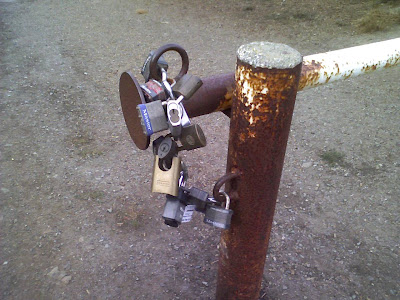


The only practical reason I could imagine for using this chain of locks is that a large number of people all need to be able to open the gate (e.g., park staff, firefighters, police). Instead of having one lock and sharing copies of the key, someone decided to give each party a lock and key. By chaining them together, any opened lock allows the gate to be opened.

I'm still not sure why they would choose this approach (if any reader is familiar with this construct, please tell me!)

With personal information, we may not share a "master key" with many people, but we offer a lot of locks and keys to a lot of different parties. Any one of them can leave us wide open. Like last week, when Administaff -- a huge co-employment organization that my employer uses -- announced ... (drumroll) ... a laptop was stolen with personal info, including SSNs, for everyone on every payroll they processed in 2006 (approximately 159,000 people total).

With friends like this ... you know the rest.

There's a wonderful FAQ on the theft, where Administaff explains that it's not the organization's fault: "the information was not saved in an encrypted location, which is a clear violation of our company’s policies." In other words, they're blaming the employee for violating the company policy.

I don't buy it.

Yes, I believe there's a company policy somewhere that says not to copy the entire human resources database onto your laptop in plain text.

But I don't believe Administaff made reasonable efforts to see that this policy would be carried out.

I suspect there were at least three distinct failures:

Failure #1: The employee whose laptop was stolen was tasked with an activity for which the easiest workflow involved loading the entire database onto his or her laptop. How do I know this? Most workers do not take the hardest route to doing their job. They take the easiest one they can.

In this case, someone took the easiest route even though it meant violating a policy (that he most likely never took note of anyway). When Administaff management allows the easiest workflow to be one with this much security exposure, they share the blame. If they don't know what workflows are being used for Social Security data, then they are failing at a bigger level, namely not auditing sensitive processes in their own identity-theft-prone line of business.

Failure #2: At best, the server system which "owns" the stolen data allowed this employee to produce a report containing critical data for a very large number of records. (At worst, this data is not stored in any controlled application at all, but rather in something like Access, FoxPro, or Excel. While I know this is a real possibility, it's such a revolting idea that I will ignore it for now.) Assuming this application has a user/role model, why would this user have such a reporting privilege?

Even if the application is designed to support some "work offline" workflow, so a that network connection is not required to access each record, this can be accomplished without any mass download of records. A modest number of records could be downloaded and cached for an offline work session, and synched back later. The record cache would, of course, be secured with a passphrase and/or other elements.

My point here is that there's no way the employee accessed and then copied/saved each of 160,000 records, one at a time. The application had to help, making it easy to do some operation on "all" or on a large set of records (birthdate in a specific year, last name starting with a certain letter, etc.) Awful idea. Administaff is leaving the door wide open, no surprise that the employee stumbles on through.

Failure #3: How long was this data on the laptop before the laptop was stolen? At one large financial institution, any computer connected to the network -- whether on site or via VPN, virtual machine or real -- was subject to regular scanning from the mother ship. The security group would check all of these machines not only for vulnerabilities (viruses, vulnerable services), but also for content. Were they after pr0n? Not so much. They wanted to find out if any disproportionate amount of their data ended up on any of your machines.

If, say, they found a file that looked like a bunch of credit-card numbers, you'd have some explaining to do. While this approach would not stop a clever data thief (who would employ steganography or removable drives), it would do a great job at stopping any accidental hoarding of customer data. In fact, it would do a great job at stopping this pervasive stolen-laptop-stolen-data problem.

Apparently Administaff really cares about this stuff. Surely enough to spend the half-hour thinking about it that I did when I wrote this post. Just not enough to actually do anything.

Wednesday, October 17, 2007

Mozy Keeps Your Data Safe ... Once You Get It Working

A while back I wrote about Carbonite, a consumer PC online backup solution. I thought the user experience was fantastic, but I didn't love the idea that my data could be decrypted with just my (low-entropy) site password.

More recently, I decided to give Mozy a try. Mozy is another leading online backup app, and they offer 2 GB of personal backup for free. Interestingly, Mozy seemed to me to have the opposite qualities (both positive and negative) as Carbonite in my trial.

The security is hard-core if you choose: Mozy generates a 448-bit encryption key from any chunk of text or file that you give it. Naturally that means your source should have some decent entropy in it, and you'd better have a copy of either the key source material or the generated key file if you ever want your data back. But the folks who really want to keep their own key will know this already.

Mozy does encryption (and presumably decryption in a restore) locally, and ships the encrypted files off to storage. So your data is pretty darned safe from anyone inside or outside of Mozy.

The "average user" experience, though, had a number of annoying snafus.

The GUI on the client tool that manages your backups and filesets is neither pretty nor intuitive. I'm tempted to compare it to some of the more mediocre Gtk front ends to Linux command-line tools. Perhaps that's too harsh, but it does have a number of similar quirks, like multiple widgets that control the same setting without being clear about it, checkboxes becoming checked or unchecked "on their own", etc.

More troubling was that the client appears non-robust in the face of network outages. When the network dropped during my initial config, the app crashed. Upon restart, it did not appear to have saved state: I had to redefine my backup sets. I then started a backup, and the app crashed again when the network momentarily dropped. This time when I restarted it did have my backup sets, but the history window showed no trace of my failed backup.

Then, during my next backup attempt, after getting several hundred megabytes onto the net, my machine rebooted itself (courtesy of a Microsoft "patch Tuesday"). When I looked at Mozy, its history again showed nothing. I would have liked some information about the failed backup, and a way to "resume." Instead, I had to start the whole backup from byte 0.

This latter time, I achieved success. But in an era of WiFi access (which can be flaky), I would expect not only robustness in the face of network connectivity issues, but also a really solid resume mechanism. After all, how many machines will succeed with the initial multi-gig upload in one go?

To finish on a positive note, I should point out first that for paranoid^H^H^H^H^H^H^H^H security conscious people, it's great to have a tool that handles strong crypto inline and gives me control over the only key. Also, a quick search suggests Mozy is ready to bring out the heavy guns to address customer problems. If they keep that up, they'll be able to overcome almost anything else.

Tuesday, September 11, 2007

MS Security Laws of Limited Use if You Don't Know Who the "Bad Guy" Is

I read (via) an excellent Microsoft TechNet article called "10 Immutable Laws of Security" and it seemed to me that one big problem is in defining the "bad guy" the author is talking about in these laws.

Here are the first 4 of the laws (the ones with the term "bad guy"):

Too often, my problem is not about one of the "10 Laws" coming into play, but wondering whether the agent I'm dealing with is a "bad guy." Obviously, if I'm thinking about downloading a random piece of potential malware, or letting users post to my website with arbitrary JavaScript, then the bad guy often fits the traditional definition of a malware distributor, black hat, etc.

But what about ... "legitimate" businesses like a media company that wants to install a broken DRM system with a rootkit? what about a company that means well but writes a compromised browser plug-in that I'm supposed to install? or a company (or client-company) IT admin who wants to physically "configure" my system for their VPN, virus protection, app protocols, etc.?

I don't let anyone upload programs or scripts to my website (intentionally) ... but what about all those widgets I might put on my site? The scripts that widgets pull into the client browser can't do any harm to my web app that I won't let them ... but from my users' point of view, anything these widgets do to them or their data, directly or indirectly is my fault.

It's a problem that's been discussed a lot (e.g., Windows Firewall exceptions, Vista UAC, etc.) My point is simply that many users (even many who are not extremely sophisticated) have a pretty good handle on laws 1-4, and need a better way to figure out whether a vaguely legitimate, well-meaning agent should count as a "bad guy" or not.

Sunday, September 02, 2007

Carbonite Keeps Your Data Safe ... But From Whom?

Plenty of online companies have leveraged broadcast advertising (Travelocity, Amazon, and Yahoo! all mounted serious campaigns). Still, when I hear about a new startup on the radio in these days of TechCrunch-driven marketing, it seems like it deserves a look.

Carbonite is a startup offering easy-to-use offsite PC backup functionality to average end users -- they've recently started mainstream media broadcast advertising in the Bay Area.

I immediately wondered about the security of my backup data, though. As a youngster, you have all kinds of "secrets" that might cause you social embarrassment or get you grounded. As an adult, though, your PC hard drive has tax returns, medical records, legal documents, banking info ... things that you really don't want compromised. So a security breach of a service like Carbonite is particularly frightening.

Notwithstanding the company's "security" FAQs, which talk about encryption and about protecting the data in transit, I started getting a sinking feeling when the password field let me choose a six-letter all-lowercase dictionary word.

Since Carbonite has no other data about me, is that password enough to get all of my data back out? I took the app for a test drive and verified that, yes, my email address and that password gets all of my PC data back. Moreover, someone could "restore" my PC files to another machine, switch my Carbonite account over to that other machine, and then change my password, locking me out.

My password can also be reset if I forget it. But I don't lose access to my backup data. That means that my password is not required to reconstruct the private key that decrypts the data. A close check of Carbonite's web site verifies that in future they plan to offer an option where only the end user keeps the private key. For now, however, they keep everyone's private key on file.

I'm not a security analyst, but I'm going to toss out a few recommendations and let the experts weigh in and improve upon this as necessary:

  • User passwords (maximum risk exposure is one individual's data)
    1. Require a stronger password than "any six characters."
    2. Communicate to the end user that this password will protect access to all of their PC data, so it's worth spending a minute to pick a longer passphrase.
    3. At least encourage the user to not use the same password that he uses for every web site (namely the first one that's gonna get stolen when he sits down at a random PC in an Internet cafe and logs onto hotmail, flickr, and MySpace).
  • Maintenance of customer private keys (risk exposure is potentially all the backup data of all customers!)
    1. For power users, get that you-keep-they-key version of the app up and running ASAP
    2. Until then, make sure best practices are maintained around the storage of the private keys and data.
    3. Presumably, the keys should not be all in the same system vulnerable to a single security compromise.
    4. The keys should not be in the same system as the data they're protecting, for the same reason.
    5. No one individual should have access to all of the keys or all of the data, on purpose or by accident.

The service definitely delivers on the ease-of-use promise, from the no-credit-card free trial to the dead-easy "it just works" client application. I just hope it doesn't come at an unreasonable cost in terms of security.

Monday, August 20, 2007

Ads "Clear" -- Security Line Benefits Not So Clear

Full disclosure: I used to work for a now-defunct startup which, in addition to doing cell phone check-in for airlines, did a bunch of airport parking, check-in, and security stuff.

So maybe it's just sour grapes as Clear moves into the SF Bay area. But this experience is also the reason I think Verified Identity Pass is misleading people with the barrage of advertising it has unleashed about it's Clear program.

In exchange for an in-depth background check, your biometric data, and a chunk of cash, you are promised a better, faster security lane experience at the airport. But here's what they're not telling you: the actual security protocol isn't any different for the Clear member than for anyone else. Don't believe me? Take a look at the TSA's Registered Traveler (RT) program page. Clear is a vendor implementation of RT.

TSA describes the "benefits" of RT as

  • "modified airport configuration to minimize ... wait times"
  • "enhanced customer service"
  • "discounts for services or concessions"

Nowhere in this list is being able to leave your shoes or coat on, keep your fluid container, or leave your laptop in its bag. At the time Skip evaluated RT participation, there was discussion at TSA surrounding waiving the "Additional Screening" described on this page for all RT members. Apparently, TSA decided against that change for now, and instead elected no changes to the security protocol at all for RT.

So Clear is just selling you a customer service promise. A promise that they will keep leasing and staffing more and more security lanes. Because as more people sign up for the program, the initially empty "Lexus lanes" will fill up. And the friendly banter may become as indifferent or hostile as that of the cellphone customer service rep who knows your only other choice is to unsubscribe, and who isn't paid to care whether you do.

Now, if someone wants to pay $99 just for a plausible chance of being able to move quicker through security (heck, SFO's average wait is under 7 minutes anyway), what's the harm?

The problem is fourfold:

  1. This scheme, which utterly lacks any innovation, makes it less likely that airports, airlines, and TSA will implement truly innovative solutions.
  2. Personal data privacy breaches by companies and government entities tell me I should worry about my background check and/or biometric data being lost or stolen. These promises are meant to make me feel good; they don't protect my data.
  3. If there is a for-pay security alternative, and airlines feel that their top flyers can/do pay it, they are likely to spend less on regular security lanes (yes, the airlines, not the government, sponsor the security lanes). Don't want to pay your kickback to the Clear folks? Stand in line an hour. Miss your flight? You're a cheapskate, stop whining.
  4. Yet another step enlarging the security-industrial complex, where we all pay, not to be secure, but to secure the financial success of a handful of well-connected companies.

Not surprisingly, local TV, newspaper, and radio all picked up Clear's story, and played it like a commercial for the future of air travel. Let's hope it's not.

Friday, July 27, 2007

LifeLock: More Shenanigans, Now Featuring Radio Jingle

I almost feel bad piling on LifeLock at this point... after all, I passed on writing when I first had an inkling something was up, at the beginning of April.

It was curious that they ignored a polite email where I articulated that I might be interested in their service, and that I understand no system is perfect, so I would like to know their views on some potential security vulnerabilities. After all, they purport to close some ID theft gaps, but they create some new weak links in the process. My friend Andy, who knows more about security and financial fraud than I, wrote this post about my concerns.

The rest is history ... Kleiner gave them $6 million a couple of weeks later. And perhaps skimped on the due diligence, since Wired has been following the company and turning up gems like

Like I said, I almost feel bad piling on at this point (and wasting your time, since if you're interested in LifeLock you've almost certainly seen the latest already).

Why only "almost"? Because, as I wrote earlier this week, "the money has to go somewhere." In particular, Kleiner Perkins' money, and Bessemer's if there's any left, is now buying radio spots in the San Francisco area for these guys. Argh. On the other hand, if tracking down and threatening crooks becomes part of that ad campaign, I might not be so quick to change stations.