Showing posts with label travel. Show all posts

Friday, August 15, 2008

Tripeedo Brings Travel Search Full-Circle

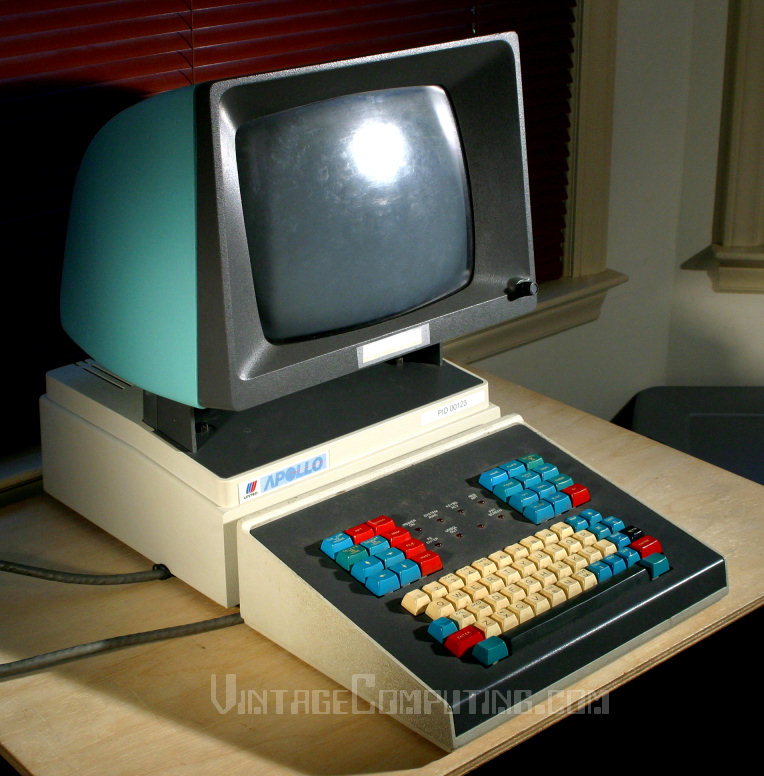
I couldn't help but crack up when I read a post about Tripeedo, an AJAX-enabled "command line for travel," since of course all this reservation searching stuff was on a command line to begin with, on a terminal a generation older than this hideous beast. And in fact while the hardware has mercifully been emulated away, the protocols are still in wide use under the hood in the travel industry.

I had to use a command line like this as recently as 2006 for a project. Unlike tripeedo's version, I recall the search started with a strange lozenge character that doesn't seem to have a proper Unicode name, but was part of the 6-bit EBCDIC charset these terminals used when they were deployed in 1969. Then came a letter or a delimiter of some sort, and then a line like 15AUGSFODFW to look at flights on August 15th from SFO to DFW.

I thought I'd try it in Tripeedo. The site prefers the month first, and it likes spaces. And, unlike the old system, it has lowercase letters too!

So I type "15 aug sfo dfw" and get some flights to look at. In 1969, this was the future.

Monday, August 20, 2007

Ads "Clear" -- Security Line Benefits Not So Clear

Full disclosure: I used to work for a now-defunct startup which, in addition to doing cell phone check-in for airlines, did a bunch of airport parking, check-in, and security stuff.

So maybe it's just sour grapes as Clear moves into the SF Bay area. But this experience is also the reason I think Verified Identity Pass is misleading people with the barrage of advertising it has unleashed about it's Clear program.

In exchange for an in-depth background check, your biometric data, and a chunk of cash, you are promised a better, faster security lane experience at the airport. But here's what they're not telling you: the actual security protocol isn't any different for the Clear member than for anyone else. Don't believe me? Take a look at the TSA's Registered Traveler (RT) program page. Clear is a vendor implementation of RT.

TSA describes the "benefits" of RT as

  • "modified airport configuration to minimize ... wait times"
  • "enhanced customer service"
  • "discounts for services or concessions"

Nowhere in this list is being able to leave your shoes or coat on, keep your fluid container, or leave your laptop in its bag. At the time Skip evaluated RT participation, there was discussion at TSA surrounding waiving the "Additional Screening" described on this page for all RT members. Apparently, TSA decided against that change for now, and instead elected no changes to the security protocol at all for RT.

So Clear is just selling you a customer service promise. A promise that they will keep leasing and staffing more and more security lanes. Because as more people sign up for the program, the initially empty "Lexus lanes" will fill up. And the friendly banter may become as indifferent or hostile as that of the cellphone customer service rep who knows your only other choice is to unsubscribe, and who isn't paid to care whether you do.

Now, if someone wants to pay $99 just for a plausible chance of being able to move quicker through security (heck, SFO's average wait is under 7 minutes anyway), what's the harm?

The problem is fourfold:

  1. This scheme, which utterly lacks any innovation, makes it less likely that airports, airlines, and TSA will implement truly innovative solutions.
  2. Personal data privacy breaches by companies and government entities tell me I should worry about my background check and/or biometric data being lost or stolen. These promises are meant to make me feel good; they don't protect my data.
  3. If there is a for-pay security alternative, and airlines feel that their top flyers can/do pay it, they are likely to spend less on regular security lanes (yes, the airlines, not the government, sponsor the security lanes). Don't want to pay your kickback to the Clear folks? Stand in line an hour. Miss your flight? You're a cheapskate, stop whining.
  4. Yet another step enlarging the security-industrial complex, where we all pay, not to be secure, but to secure the financial success of a handful of well-connected companies.

Not surprisingly, local TV, newspaper, and radio all picked up Clear's story, and played it like a commercial for the future of air travel. Let's hope it's not.

Thursday, May 17, 2007

Flight Data Button 0.5 for Outlook

I've spent a little time working on an Outlook add-in for putting flights in my calendar. A few weeks back, I took a trip and wanted to be able to pull up flight status on my phone, without keying in an address and surfing, or installing an app like Skip. (Skip is great, but was never fully implemented for Smartphone.)

 So I put my flight into Outlook as a calendar item, and put a link in it to FlightStats Mobile, for my specific flight. FlightStats is the premier flight data provider in the U.S. -- many airport flight boards actually get their data feeds from FlightStats. Now, when my phone syncs with Exchange, the flight item comes onto my phone along with a quick-click link for status.

I decided this is a useful thing to automate, since any system that syncs Exchange to a device (DirectPush, Blackberry Enterprise Server, Moto/Good) would carry the link. But I was frustrated that I needed to key in the flight times, and I realized that should be automated too. To top it off, I foolishly ended up booking an appointment during time I needed to be driving (but which showed "free" in my calendar) -- so I figured my "automation" widget ought to add the travel time to and from the airport, and the time waiting at the airport before departure.

Using OpenKapow, I built a web service that scrapes flight schedule data. Assembling a FlightStats link is almost straightforward (getting to the individual segment within a flight number turned out to be tricky). And integrating to Office is delightfully simple thanks to great templates that take all the work out of it so a lazy sod like me can just write business logic.

I've called the addin "Flightify" since, to use it, you select an appointment in your Outlook calendar (where you've previously stuck some basic flight info), click the button, and the plug-in "flightifies" the appointment.

Here's an example: you start with basic info like this:


Click the button, and select the additional calendar items you'd like:


And a few seconds later your calendar shows the sad reality of your travel day:


You can't see them, but the mobile links to realtime flight status are embedded in the body of the flight item, so it's ready-to-click on your phone.

Here's the project page with the download/install if you want to try it. Full source code is there too.

I wanted to make this more of a learning experience and use the Outlook Addin templates that ship as part of Visual Studio Orcas Beta 1. I could try out more of Orcas and easily produce both an Office 2003 and Office 2007 version of my button.

Unfortunately, the Orcas Beta includes project templates, but not all of the Interop Assemblies you need to build the project (Office COM libs are required as well). So to get it building I would have needed to install Office on the Orcas test machine (in my case a VM with limited resources, meant for testing VS CTPs). My recommendation to Visual Studio team? Ship stub DLLs that implement the relevant COM classes (perhaps they just log calls to a file) and all of the Interop Assemblies. That way, the machine where Orcas is running doesn't need to have Office installed and can still successfully build these Office project types.

A few final thoughts on the plug-in:

  • Since the web service calls run in the main thread, Outlook will freeze for a second or two while they're being made. Considering that Outlook freezes the UI thread all the time while doing its own built-in tasks, I didn't put a lot of time into a proper workaround.

  • I don't write a lot of Windows Forms apps, so I was pleasantly surprised that the snap-band positioning logic in the form designer allowed my dialog box to appear the same on both a standard and high-DPI display without my having to do anything special.

  • The automagical "Setup Project" builder was also great. I didn't really have to do anything, and it produced a nice exe/msi install, that includes registering my addin with COM via RegAsm.