Not the concept. But these offerings are so predictable, and so predictably bad, in their pricing that each one is just another big delay before a service can finally be produced that offers real value to consumers, studios, content creators, and publishers/distributors.
Here are a couple of examples. First up, this Bittorrent service: from them, for $4, I get a 24-hour viewing period on a media file playable in some devices, with Windows Media Player.
Now, behind door #2, I have a video store where for a little over $3, I can get a physical disk that will play in far more devices, for a period of several days, most likely with better video and sound quality.
Maybe this demo (males 15-35) is too cool to go to a video store? I doubt it, but you also have Netflix. A conservative calculation (cycling 2 disks per week on a 3-at-a-time sub) yields about $2 per rental. Plus I can keep the disk as long as I like, and I have the luxury to not watch it in 24 hours if I’m busy. Although I do pay another convenience cost in that I am dealing with the Netflix queue, not an on-demand selection, this cost is essentially paid to Netflix; that is, it is a virtual subsidy of the Netflix operational model. The studios get no benefit from that at all, since the relative physical scarcity of disks is not in their model (they fix the original disk price and press as many as they can sell), but only enters into Netflix’ model (Netflix can only reasonably acquire, use, and then dispose of a modest number of disks for each film).
There’s also on-demand films from satellite/cable. Cost: $4. Terms of use? basically old school TV on VHS rules: I can record the show to my TiVo and make suitable personal copies (e.g. with my DVD recorder), which last indefinitely and which I am allowed to watch whenever I want. Downside? NTSC quality video.
Bittorrent is selling me a strictly inferior good at a higher price. Economics says they’re not going to succeed, and the studios will claim it’s because viewers are all crooked.
Not to pick on Bittorrent in particular – without doing a rundown of all of these work-alike online stores, let’s look at one more: Amazon Unbox made headlines for its onerous Terms of Service as well as its implausible pricing. Here are a few couple of typical price matchups all from amazon.com:
The Departed:
Unbox restricted download: $14.99;
actual DVD, widescreen with extras: $15.99;
BluRay high def 1080p disk $23.95
The Devil Wears Prada:
Unbox restricted download: $14.99;
DVD new $13.89;
DVD used ("very good condition") $8.76
Babel:
Download: $14.99;
DVD new: $14.24;
HDDVD or BluRay: $27.95
In some cases there are shipping charges, but there are numerous ways to avoid shipping charges on Amazon. For reference, iTunes new releases are around $12.99 and are also heavily restricted.
The point here is that not only do these ventures refuse to concede that more restrictions on media make it less valuable to the consumer, but they actually imagine that they are somehow innovating in a way that will let them charge more than the baseline cost (physical DVD/CD and accompanying rights are the baseline).
Nothing here suggests that the media should or must be "free" – only that Bittorrent president/cofounder Ashwin Navin and the studios are all yanking our chains when Navin says, "We're really hammering the studios to say, 'Go easy on this audience' ... We need to give them a price that feels like a good value relative to what they were getting for free."
Monday, February 26, 2007

Thursday, February 22, 2007
MSFT apologia
Ok, it's not a huge secret that I'm a Microsoft apologist (that is to say defender). Not that Microsoft hasn't made its share of mistakes and done some things wrong. But yesterday a friend, not a developer but a power user, lightheartedly referred to Bill et al. as "software bozos" and I felt obliged to point out a few things...
Microsoft produces great products under an unbelievable set of constraints. Customers want Microsoft stuff to work seamlessly on everything from cell phones to PCs to set-top boxes to web servers to XBox 360s; they want it to make sense to everyone from CEOs to doctors to my mom; they want it to be localized (support local language, culture, currency, calendar, phones) everywhere in the world, and to be accessible to the handicapped and to be secure even when an extremely unsophisticated user tries to do really dumb things.
They also want it to be inexpensive and to work on any cheap hardware you buy off the 'net and install it on (unlike, say, Apple, where the OS is only legal and supported on the hardware they're in the mood to offer this month); oh and besides being a general purpose operating system, customers like it that Windows is one of the most advanced 3D gaming platforms, competing with dedicated gaming consoles that cost just as much to build as a PC and need do nothing except play games...
Oh, and also, unlike pretty much any other OS I'm familiar with, customers (especially business customers) need it to be perpetually backward compatible, so that when they put a new Vista machine together today it'll still run line-of-business apps that were written for DOS 4.01 in the 80s, and somehow magically these old apps will print reports on the new color laser printers attached to the computer, that were never even dreamt of when the apps were written. And mostly this actually works.
Now let's say you live in America and you buy a new/upgrade copy of Windows every 4 years for about $200, and a new copy of Office for about $400. You're paying about $12.50 per month. And you get the security updates, and browser updates, media player, Virtual PC, development tools (if that's your thing) and all kinds of other stuff for free (or included in your $12.50 per month admission price if that's the way you want to think about it.)
I'm not sure there's anything else I pay $12.50/month for that even tries to think about solving problems on this kind of scale, let alone succeeds.
Lastly, someone will be tempted to point out that Microsoft's enormous presence in the client OS and office productivity space may inhibit all kinds of other software ecosystems from flourishing. There are a number of open questions about this. First, it is reasonable to believe that standardization at one level in a stack enables massive innovation at the next level up the stack, which would otherwise have been impractical. This goes for any platform piece -- Ethernet, Windows, *nix, Java, HTTP...
More importantly, do not assume for a minute that the open PC architecture would even exist without the dominating historical presence of Microsoft Windows. The fact that you can even sit down with an assembler and start hacking a boot image and work your way up to running literally whatever you want on a readily available PC has never been a given. Considering the attitudes of more closed OS and hardware makers in other ecosystems (like cell phones), it is entirely possible that without Microsoft and the need for backwards compatibility, just running code on a cheap mass-produced box would long ago have required signed code, a crypto key from some industry licensing group, and more cash for membership and fees than any small company is ever going to have.
Microsoft produces great products under an unbelievable set of constraints. Customers want Microsoft stuff to work seamlessly on everything from cell phones to PCs to set-top boxes to web servers to XBox 360s; they want it to make sense to everyone from CEOs to doctors to my mom; they want it to be localized (support local language, culture, currency, calendar, phones) everywhere in the world, and to be accessible to the handicapped and to be secure even when an extremely unsophisticated user tries to do really dumb things.
They also want it to be inexpensive and to work on any cheap hardware you buy off the 'net and install it on (unlike, say, Apple, where the OS is only legal and supported on the hardware they're in the mood to offer this month); oh and besides being a general purpose operating system, customers like it that Windows is one of the most advanced 3D gaming platforms, competing with dedicated gaming consoles that cost just as much to build as a PC and need do nothing except play games...
Oh, and also, unlike pretty much any other OS I'm familiar with, customers (especially business customers) need it to be perpetually backward compatible, so that when they put a new Vista machine together today it'll still run line-of-business apps that were written for DOS 4.01 in the 80s, and somehow magically these old apps will print reports on the new color laser printers attached to the computer, that were never even dreamt of when the apps were written. And mostly this actually works.
Now let's say you live in America and you buy a new/upgrade copy of Windows every 4 years for about $200, and a new copy of Office for about $400. You're paying about $12.50 per month. And you get the security updates, and browser updates, media player, Virtual PC, development tools (if that's your thing) and all kinds of other stuff for free (or included in your $12.50 per month admission price if that's the way you want to think about it.)
I'm not sure there's anything else I pay $12.50/month for that even tries to think about solving problems on this kind of scale, let alone succeeds.
Lastly, someone will be tempted to point out that Microsoft's enormous presence in the client OS and office productivity space may inhibit all kinds of other software ecosystems from flourishing. There are a number of open questions about this. First, it is reasonable to believe that standardization at one level in a stack enables massive innovation at the next level up the stack, which would otherwise have been impractical. This goes for any platform piece -- Ethernet, Windows, *nix, Java, HTTP...
More importantly, do not assume for a minute that the open PC architecture would even exist without the dominating historical presence of Microsoft Windows. The fact that you can even sit down with an assembler and start hacking a boot image and work your way up to running literally whatever you want on a readily available PC has never been a given. Considering the attitudes of more closed OS and hardware makers in other ecosystems (like cell phones), it is entirely possible that without Microsoft and the need for backwards compatibility, just running code on a cheap mass-produced box would long ago have required signed code, a crypto key from some industry licensing group, and more cash for membership and fees than any small company is ever going to have.
Tuesday, February 20, 2007
Grepping in PowerShell
I originally wrote this for the company wiki the other day, and thought it might be useful to a wider audience. The context is parsing and processing an iTunes library.xml file (just a one-off task), which I thought might a be a fun and educational opportunity to slice, dice, and ... how does that Ron Popeil commercial go? ... with PowerShell.
PowerShell is the new shell for Windows. New, and supported, but not "the official" in the sense that it doesn't ship with Vista, although I'm guessing it will ship in the Longhorn Server rev.
If you're used to Unix shells, then you'll probably be floored by the power of PowerShell and somewhat annoyed by the syntax, which, despite liberal aliases to familiar things like ls takes some getting used to.
.net framework integration means you can easily access any object in the .net base class library, and there are some special tricks that do some of this for you too. The canonical example seems to be this one, a quickie rss reader:
$wc = new-object System.Net.WebClient
$rssdata = [xml]$wc.DownloadString(‘http://foo.bar/rss.xml’)
write-host $rssdata.rss.channel.title
$rssdata.rss.channel.item | foreach { write-host $_.title }
Since the source file is xml, I had thought the XML parsing would come in handy, but it turned out that there was no real data model to the XML. Basically, there is just a big nested map structure (key-value pairs in blocks) in the item list. Sort of XML for the "takes-void*-returns-void*" crowd. So then grep looked promising because the keys and values (and their tags) were grouped on individual lines.
Grepping is a little counterintuitive with PowerShell because the pipeline between commandlets in PowerShell is filled with full-on objects not strings. If you just want text, you can use Get-Content, which provides its output as a bunch of string objects, 1 per line, which is convenient. Here's an example I came up with after struggling a little bit to get a grep type of functionality. I throw a sort and unique on here for fun:
Get-Content Library.xml | ForEach-Object { if ($_ -match [regex]"(?<=Artist\<.{13}).*(?=\<\/)" ) { $matches[0] }} | Sort-Object | Get-Unique | Out-File lib.txt
Many of these things can be abbreviated too, so if you want your script to read a little tighter, you can use
gc Library.xml | % { if ($_ -match [regex]"(?<=Artist\<.{13}).*(?=\<\/)") { $matches[0] }} | sort | unique
Isn't that sweet?
Since the regex uses zero-width lookahead and lookbehind assertions instead of extracting a marked subexpression, I'm curious if anyone has input on whether one approach is faster / better / shinier than the other.
My first guess is that they are similar, since my first cut at implementing lookahead + lookbehind would probably be to match the whole outer expression while naming the non-zero-width-bit in the middle, and assigning the value of that to the expression.
PowerShell is the new shell for Windows. New, and supported, but not "the official" in the sense that it doesn't ship with Vista, although I'm guessing it will ship in the Longhorn Server rev.
If you're used to Unix shells, then you'll probably be floored by the power of PowerShell and somewhat annoyed by the syntax, which, despite liberal aliases to familiar things like ls takes some getting used to.
.net framework integration means you can easily access any object in the .net base class library, and there are some special tricks that do some of this for you too. The canonical example seems to be this one, a quickie rss reader:
$wc = new-object System.Net.WebClient
$rssdata = [xml]$wc.DownloadString(‘http://foo.bar/rss.xml’)
write-host $rssdata.rss.channel.title
$rssdata.rss.channel.item | foreach { write-host $_.title }
Since the source file is xml, I had thought the XML parsing would come in handy, but it turned out that there was no real data model to the XML. Basically, there is just a big nested map structure (key-value pairs in blocks) in the item list. Sort of XML for the "takes-void*-returns-void*" crowd. So then grep looked promising because the keys and values (and their tags) were grouped on individual lines.
Grepping is a little counterintuitive with PowerShell because the pipeline between commandlets in PowerShell is filled with full-on objects not strings. If you just want text, you can use Get-Content, which provides its output as a bunch of string objects, 1 per line, which is convenient. Here's an example I came up with after struggling a little bit to get a grep type of functionality. I throw a sort and unique on here for fun:
Get-Content Library.xml | ForEach-Object { if ($_ -match [regex]"(?<=Artist\<.{13}).*(?=\<\/)" ) { $matches[0] }} | Sort-Object | Get-Unique | Out-File lib.txt
Many of these things can be abbreviated too, so if you want your script to read a little tighter, you can use
gc Library.xml | % { if ($_ -match [regex]"(?<=Artist\<.{13}).*(?=\<\/)") { $matches[0] }} | sort | unique
Isn't that sweet?
Since the regex uses zero-width lookahead and lookbehind assertions instead of extracting a marked subexpression, I'm curious if anyone has input on whether one approach is faster / better / shinier than the other.
My first guess is that they are similar, since my first cut at implementing lookahead + lookbehind would probably be to match the whole outer expression while naming the non-zero-width-bit in the middle, and assigning the value of that to the expression.
Monday, February 12, 2007
Yipes it's Y! Pipes
Super cool: there is no reason that a human should need to handwrite HTTP/XML/mashup/filtering logic for simple cases. Even with the highest-level toolkit, it still requires time, introduces bugs, needs to be hosted...
Systems like this are about moving toward a declarative specification for extracting semantics from web services (in this case RSS).
This particular implementation is a bit fancy on the graphics, which makes it run slowly, and it seems like it needs to extract data from RSS only. That is, if you try it out, it expects every URL "fetch" result to look like an RSS formatted collection of "somethings" ... which is nice, but it would be cool if you could also process XML from REST queries, or build SOAP queries as well. My first inclination was to ask for some kind of RegEx widget, but perhaps the Y! Pipes team intentionally doesn't want to allow us to go down that route ... over time they want more structure, not less structure in the data. They probably feel like RegEx has already been done in the HTML scraping world, although there is certainly lots more work to do there.
If you are interested in this stuff, check out some other approaches and flavors of this notion too:
- Dapper which tries to build web services on top of any web page as a data source. These guys have a "virtual browser" which lets you point and click your way through existing pages to build a service
- Kapow and OpenKapow -- enterprise and "free online" design tools for scraping, mixing, mashing and republishing the web
- QL2 an "old-school" enterprise software product used for industrial strength scraping, it implements a query language so that you can treat the web data sources that are being used as a virtual database (!) (frighteningly enough for an "unstructured data" query tool, this system is used in some large mission critical apps)
- YubNub: this souped-up version of wget lets you define "commands" (aka abbreviations) for issuing web queries, can substitute parameters, and pipe things together. It's arbitrarily extensible since you can always write a servlet/ashx/&c. to provide any data access or transformation you might want. On the other hand, it's more about plaintext (or human readable anyway) than XML
Systems like this are about moving toward a declarative specification for extracting semantics from web services (in this case RSS).
This particular implementation is a bit fancy on the graphics, which makes it run slowly, and it seems like it needs to extract data from RSS only. That is, if you try it out, it expects every URL "fetch" result to look like an RSS formatted collection of "somethings" ... which is nice, but it would be cool if you could also process XML from REST queries, or build SOAP queries as well. My first inclination was to ask for some kind of RegEx widget, but perhaps the Y! Pipes team intentionally doesn't want to allow us to go down that route ... over time they want more structure, not less structure in the data. They probably feel like RegEx has already been done in the HTML scraping world, although there is certainly lots more work to do there.
If you are interested in this stuff, check out some other approaches and flavors of this notion too:
- Dapper which tries to build web services on top of any web page as a data source. These guys have a "virtual browser" which lets you point and click your way through existing pages to build a service
- Kapow and OpenKapow -- enterprise and "free online" design tools for scraping, mixing, mashing and republishing the web
- QL2 an "old-school" enterprise software product used for industrial strength scraping, it implements a query language so that you can treat the web data sources that are being used as a virtual database (!) (frighteningly enough for an "unstructured data" query tool, this system is used in some large mission critical apps)
- YubNub: this souped-up version of wget lets you define "commands" (aka abbreviations) for issuing web queries, can substitute parameters, and pipe things together. It's arbitrarily extensible since you can always write a servlet/ashx/&c. to provide any data access or transformation you might want. On the other hand, it's more about plaintext (or human readable anyway) than XML
Wednesday, January 31, 2007
A Little Less Code, A Little More Action
I've been working on a side project, with a very web 2.0 flavor, partly serious (I really want to use this product, so I'm building it myself) and partly tongue-in-cheek (includes many free cliches, from the GEN-U-INE web-2.0-logo-generator masthead to a name that ends in -r).
In trying to maximize my productivitah and agilitah, I've been forcing myself to write absolutely as little code as possible, and to lean heavily on framework pieces that let me get it running now, and refine/refactor/redo later:
1. ASP.net 2.0 -- the built in support for users, roles, master pages, data binding to arbitrary objects, integrating SOAP web services, and mobile web pages is both well documented and fantastic. Been around for a few years, hardly news. Well understood and can scale like a mofo if I'm ever so lucky.
2. ASP.net AJAX and the AJAX Control Toolkit -- these are newer and totally rock out. In my book, there are only two long-term high-productivity high-sustainability conceptual approaches to AJAX. One is the ASP.net AJAX approach (there are also libraries on other platforms that use this same method), where simple declarative markup causes automatic generation of relevant client side code, server side endpoints, object marshalling, etc.
This allows really neat tricks like the following: start with an asp:calendar tag for a calendar control. Bind any sort of logic you want to its ASP.net post-back driven events on the server -- as simple as changing the UI or as sophisticated as booking a reservation on the selected date. Now just wrap the tag inside an asp:updatepanel like this
...and now your post-back is done, server code run, and results rendered all in an AJAX call.
The other sane approach is the Google Web Toolkit / Script# approach, of writing the client app in Java or C# with static typing, interactive debugging, refactoring, etc., and then compiling to Javascript as a build step. Of course I did succumb to one use of the "unsustainable" approach -- hand-coding a particular AJAX feature I wanted -- but I think that most typical AJAX cases can be handled by one of the above structured approaches.
3. SubSonic, an ActiveRecord implementation for .net -- I'm a big fan of object-oriented design, which usually means a heavier OR/M layer to a substantially distinct RDB schema. But for a simple project with a tiny straightforward domain model, I wrote the schema and went with ActiveRecord instead. I am extremely impressed with SubSonic. It does just what you want, code is easy to debug in the rare case something blows up, and poof! automagic simple data-accesss layer with beautiful generated classes, and no code.
Using these three framework pieces, I've managed to put together a site with users, roles, profiles, a dozen pages, a half-dozen mobile pages with automatic device-specific rendering, data access for the actual domain objects, mashing up a couple of external services, AJAX where appropriate ... in probably less than 250 lines of hand coded C#, and less than one man-week of effort.
Time (and some free analytics data) will tell whether it's useful to anyone besides myself, and whether I should expand it with more sophisticated functionality. But of course the beautiful thing (and yet another web 2.0 cliche) is that with this little effort to build, and a few bucks a month to host ... it's a fun time and who cares if no one else wants to use it ?
In trying to maximize my productivitah and agilitah, I've been forcing myself to write absolutely as little code as possible, and to lean heavily on framework pieces that let me get it running now, and refine/refactor/redo later:
1. ASP.net 2.0 -- the built in support for users, roles, master pages, data binding to arbitrary objects, integrating SOAP web services, and mobile web pages is both well documented and fantastic. Been around for a few years, hardly news. Well understood and can scale like a mofo if I'm ever so lucky.
2. ASP.net AJAX and the AJAX Control Toolkit -- these are newer and totally rock out. In my book, there are only two long-term high-productivity high-sustainability conceptual approaches to AJAX. One is the ASP.net AJAX approach (there are also libraries on other platforms that use this same method), where simple declarative markup causes automatic generation of relevant client side code, server side endpoints, object marshalling, etc.
This allows really neat tricks like the following: start with an asp:calendar tag for a calendar control. Bind any sort of logic you want to its ASP.net post-back driven events on the server -- as simple as changing the UI or as sophisticated as booking a reservation on the selected date. Now just wrap the tag inside an asp:updatepanel like this
<asp:UpdatePanel ID="UpdatePanel1" runat="server">
   <ContentTemplate>
      <asp:Calendar ID="Calendar1" runat="server"/>
   </ContentTemplate>
</asp:UpdatePanel>
...and now your post-back is done, server code run, and results rendered all in an AJAX call.
The other sane approach is the Google Web Toolkit / Script# approach, of writing the client app in Java or C# with static typing, interactive debugging, refactoring, etc., and then compiling to Javascript as a build step. Of course I did succumb to one use of the "unsustainable" approach -- hand-coding a particular AJAX feature I wanted -- but I think that most typical AJAX cases can be handled by one of the above structured approaches.
3. SubSonic, an ActiveRecord implementation for .net -- I'm a big fan of object-oriented design, which usually means a heavier OR/M layer to a substantially distinct RDB schema. But for a simple project with a tiny straightforward domain model, I wrote the schema and went with ActiveRecord instead. I am extremely impressed with SubSonic. It does just what you want, code is easy to debug in the rare case something blows up, and poof! automagic simple data-accesss layer with beautiful generated classes, and no code.
Using these three framework pieces, I've managed to put together a site with users, roles, profiles, a dozen pages, a half-dozen mobile pages with automatic device-specific rendering, data access for the actual domain objects, mashing up a couple of external services, AJAX where appropriate ... in probably less than 250 lines of hand coded C#, and less than one man-week of effort.
Time (and some free analytics data) will tell whether it's useful to anyone besides myself, and whether I should expand it with more sophisticated functionality. But of course the beautiful thing (and yet another web 2.0 cliche) is that with this little effort to build, and a few bucks a month to host ... it's a fun time and who cares if no one else wants to use it ?
Thursday, January 18, 2007
Moving On but not Skipping Out
In the interest of full disclosure, yesterday was my last official day at Skip Interaction. I'll be moving on to new projects which I hope to discuss here soon.
Most likely I will continue to support Skip's efforts in one or another fashion as the company seeks to move up to the next level of larger distribution channels, additional funding, and the fun stuff: more one-click travel functionality.
Most likely I will continue to support Skip's efforts in one or another fashion as the company seeks to move up to the next level of larger distribution channels, additional funding, and the fun stuff: more one-click travel functionality.
Wednesday, January 17, 2007
A Computer that You Can Program: How Novel
In a big-boxy toy store I noticed what might be called kids' computers. These are laptop form-factor devices made for kids, that include age-appropriate pseudo-educational games.
These devices are sophisticated, with full keyboards, card slots, USB connectivity, mice, touch screens and touch pads in some cases... and benefiting from overseas production in mass quantities, they range in price from around $30 to $90. This page, if you scroll all the way to the bottom and look at the last three rows, shows the devices I'm talking about.
I'm standing there thinking, "Sweet!" ... How cool would it have been to have one of these to work on when I was a kid, programming a Color Computer 2 that cost over $500 inflation-adjusted (about $250 at the time). I learned more from programming the CoCo than from any software I could have run on it. And I believe that any child will learn more from creating with a computer than from some "shape drill" or "math drill" software. Just as I give my son blocks and Lego bricks to build with, I wondered if these inexpensive laptop wonder toys had a code mode, where the child could write a program, in Logo, BASIC, Squeak or anything else.
So far as I can tell, after reading through the manual (published online) for VTech's top-of-the-line Color Blast Notebook, there is no opportunity for programming this device. The manual for the Touch Tablet notebook (which supports PC connectivity) also shows a huge list of interesting built-in programs and utilities (including a whole category of "math and logic"), but no programming language.
With Logo and Squeak, programming can be as fun and easy as using Lego blocks. Making kids' computers impenetrable objects featuring only software that is published to them, rather than created by them, makes about as much sense as teaching kids about shapes but never giving them a crayon and letting them draw.
These devices are sophisticated, with full keyboards, card slots, USB connectivity, mice, touch screens and touch pads in some cases... and benefiting from overseas production in mass quantities, they range in price from around $30 to $90. This page, if you scroll all the way to the bottom and look at the last three rows, shows the devices I'm talking about.
I'm standing there thinking, "Sweet!" ... How cool would it have been to have one of these to work on when I was a kid, programming a Color Computer 2 that cost over $500 inflation-adjusted (about $250 at the time). I learned more from programming the CoCo than from any software I could have run on it. And I believe that any child will learn more from creating with a computer than from some "shape drill" or "math drill" software. Just as I give my son blocks and Lego bricks to build with, I wondered if these inexpensive laptop wonder toys had a code mode, where the child could write a program, in Logo, BASIC, Squeak or anything else.
So far as I can tell, after reading through the manual (published online) for VTech's top-of-the-line Color Blast Notebook, there is no opportunity for programming this device. The manual for the Touch Tablet notebook (which supports PC connectivity) also shows a huge list of interesting built-in programs and utilities (including a whole category of "math and logic"), but no programming language.
With Logo and Squeak, programming can be as fun and easy as using Lego blocks. Making kids' computers impenetrable objects featuring only software that is published to them, rather than created by them, makes about as much sense as teaching kids about shapes but never giving them a crayon and letting them draw.
Tuesday, January 16, 2007
P#: Yet Another Reason I Love .net and the CLR
When Microsoft said that the CLR was designed to support many languages that might be right for many tasks, I don't think they meant fundamentally similar languages like VB and C# (modulo the syntax).
What's really cool is being able to cruise along in C# ... and then let Prolog go to work on your logic resolution with this Prolog implementation.
Here's a partial list of .net languages from Ada to Zonnon.
What's really cool is being able to cruise along in C# ... and then let Prolog go to work on your logic resolution with this Prolog implementation.
Here's a partial list of .net languages from Ada to Zonnon.
Sunday, January 14, 2007
Bruce Tate's Gettysberg Address
Bruce Tate is a consultant probably best known for working on Java, and for publishing the book Beyond Java.
I recently read Bruce's more recent From Java to Ruby, while standing in the tech section of the San Rafael, California Borders store. Sorry, Bruce, that you won't get the royalties for this, but I just couldn't put it down.
This book has a lot of great content (not that I don't have a small bone to pick here or there ... if you really think .net is still Java's separated-at-birth-twin in 2006, you need to spend more time using it). But what really struck me was the elegance, brevity, comprehensiveness, and precision of the book. A few more writers like Bruce, and we could happily live without about 90% of the IT press.
In precise, minimalist language Bruce systematically looks at the where Java and Ruby came from; where they each excel; where they fall short; how they compare to their predecessors and contemporaries in various dimensions -- real, no nonsense dimensions that enterprise architects think about; and how to get started with Ruby (if you want to) with a fabulous insight into the organizational dynamics that would foster different kinds of Ruby trials.
You get the immediate and lasting impression that this is a guy who really has a valuable perspective on the long-term evolution of software engineering practice, from the Mythical Man Month through today's productivity push with things RoR, and on into the future.
I recently read Bruce's more recent From Java to Ruby, while standing in the tech section of the San Rafael, California Borders store. Sorry, Bruce, that you won't get the royalties for this, but I just couldn't put it down.
This book has a lot of great content (not that I don't have a small bone to pick here or there ... if you really think .net is still Java's separated-at-birth-twin in 2006, you need to spend more time using it). But what really struck me was the elegance, brevity, comprehensiveness, and precision of the book. A few more writers like Bruce, and we could happily live without about 90% of the IT press.
In precise, minimalist language Bruce systematically looks at the where Java and Ruby came from; where they each excel; where they fall short; how they compare to their predecessors and contemporaries in various dimensions -- real, no nonsense dimensions that enterprise architects think about; and how to get started with Ruby (if you want to) with a fabulous insight into the organizational dynamics that would foster different kinds of Ruby trials.
You get the immediate and lasting impression that this is a guy who really has a valuable perspective on the long-term evolution of software engineering practice, from the Mythical Man Month through today's productivity push with things RoR, and on into the future.
Friday, January 12, 2007
DIV is the new TABLE
Ok, I'm not a web designer by any stretch of the imagination, let alone an expert in building layouts using CSS. On the other hand, I've been using HTML and its offshoots since before it was the standard for the WWW. So I'm puzzled that designers spend pages debating the best way to get, say, a 3-column layout to work well in various browsers using CSS, and that there isn't a straightforward declarative way to do it.
I used to do "desktop publishing" (remember that term?) with a Mac SE, 1 MB of RAM and PageMaker. PageMaker had no problem working with all sorts of page layouts: first creating columns and then adding blocks that lived in, around, across, or through those columns, with and without "flow"... on more or less any size piece of paper ... and it could do WYSIWYG on the Mac SE's tiny monochrome screen while delivering mathematically precise PostScript for prepress work. A different but equally effective view of the world was that of QuarkXPress, where content blocks asserted their own column layout, rather than just snapping to column guides on a page. So it's really not such a hard problem in 2007.
There is a CSS3 draft published over a year ago on multi-column layout. The next step in that process appears to be another draft. I have to believe that someone is overthinking the problem. Start with column count and gutter, all uniform, and go from there. Then go back and add uneven columns, blocks that span multiple columns, flow of content between elements.
Never mind that CSS allows (or could allow) you to flip every switch on every element in a page -- good design should let you do first things first. And the first thing for many page templates is a header-multicolumn-footer layout. CSS without core layout declarations is like a sophisticated office phone where you can't find the number pad.
Defenders of the CSS process may blame the browsers, and there is blame to go around on some well-known bugs. But an overly complex (dare I say overengineered?) spec for how CSS must work doesn't make it easy for browser makers to comply. Instead, it gives them cover. Meanwhile Microsoft and Adobe are edging in on "standard XHTML/CSS" with extremely appealing flow document alternatives. I love Flash, WPF, and WPF/E. But I'd hate to see proprietary runtimes become the only way to deliver top quality design experiences on the web.
I used to do "desktop publishing" (remember that term?) with a Mac SE, 1 MB of RAM and PageMaker. PageMaker had no problem working with all sorts of page layouts: first creating columns and then adding blocks that lived in, around, across, or through those columns, with and without "flow"... on more or less any size piece of paper ... and it could do WYSIWYG on the Mac SE's tiny monochrome screen while delivering mathematically precise PostScript for prepress work. A different but equally effective view of the world was that of QuarkXPress, where content blocks asserted their own column layout, rather than just snapping to column guides on a page. So it's really not such a hard problem in 2007.
There is a CSS3 draft published over a year ago on multi-column layout. The next step in that process appears to be another draft. I have to believe that someone is overthinking the problem. Start with column count and gutter, all uniform, and go from there. Then go back and add uneven columns, blocks that span multiple columns, flow of content between elements.
Never mind that CSS allows (or could allow) you to flip every switch on every element in a page -- good design should let you do first things first. And the first thing for many page templates is a header-multicolumn-footer layout. CSS without core layout declarations is like a sophisticated office phone where you can't find the number pad.
Defenders of the CSS process may blame the browsers, and there is blame to go around on some well-known bugs. But an overly complex (dare I say overengineered?) spec for how CSS must work doesn't make it easy for browser makers to comply. Instead, it gives them cover. Meanwhile Microsoft and Adobe are edging in on "standard XHTML/CSS" with extremely appealing flow document alternatives. I love Flash, WPF, and WPF/E. But I'd hate to see proprietary runtimes become the only way to deliver top quality design experiences on the web.
Wednesday, December 13, 2006
Obligatory Windows Vista Post (™), Part 2
Improved high-density display support is a big part of Vista. But what about those of us with low-DPI displays?
Ok, is that supposed to be a joke? Who would have a low resolution display?
Anyone who has a LCD panel larger than 17" and which runs at a native resolution of 1280x1024. Which is to say, anyone who has bought a nice desktop 18" or 19" panel in the last couple of years (excluding some widescreens, and the 19" panels at 1600x1200). The Vista "baseline" resolution is 96 DPI, which turns out to be just right for typical 17" flat panels (at 1280x1024). On these displays, UI elements which are sensitive to DPI render beautifully. In particular, the ClearType font smoothing technology which is widely used in Vista, even for legacy apps.
That same ClearType logic on 18" panels (87 DPI or thereabouts) or larger produces text so blurry it's distinctly uncomfortable to read.
The display customization box where a user can specify the DPI of the display has another complementary quirk: it allows you to choose higher-than-standard pixel densities, but not lower ones. If one types in a lower pixel density (as a percentage), it "snaps" back to the default setting. Moreover, if you have two monitors with two different pixel densities (I can't be the only one in the world in this situation), there's no way to specify that. It may be the case that a video card can supply this additional option, but it's not available in the latest nVidia drivers. And what if you have two different video cards (so that a single driver is not managing both of them)? The latter possibility suggests that the OS needs to provide this option...
Any ideas out there? Am I missing the "big red button" somewhere that fixes this? (By fix, I mean offer a place to enter the precise DPI of each display, so that the OS can inform apps, and tune its own services [ClearType] accordingly.)
Finally, lest anyone wonder why a large lower-res display (such as 19" monitor at 1280x1024 native resolution) would ever be desirable:
Ok, is that supposed to be a joke? Who would have a low resolution display?
Anyone who has a LCD panel larger than 17" and which runs at a native resolution of 1280x1024. Which is to say, anyone who has bought a nice desktop 18" or 19" panel in the last couple of years (excluding some widescreens, and the 19" panels at 1600x1200). The Vista "baseline" resolution is 96 DPI, which turns out to be just right for typical 17" flat panels (at 1280x1024). On these displays, UI elements which are sensitive to DPI render beautifully. In particular, the ClearType font smoothing technology which is widely used in Vista, even for legacy apps.
That same ClearType logic on 18" panels (87 DPI or thereabouts) or larger produces text so blurry it's distinctly uncomfortable to read.
The display customization box where a user can specify the DPI of the display has another complementary quirk: it allows you to choose higher-than-standard pixel densities, but not lower ones. If one types in a lower pixel density (as a percentage), it "snaps" back to the default setting. Moreover, if you have two monitors with two different pixel densities (I can't be the only one in the world in this situation), there's no way to specify that. It may be the case that a video card can supply this additional option, but it's not available in the latest nVidia drivers. And what if you have two different video cards (so that a single driver is not managing both of them)? The latter possibility suggests that the OS needs to provide this option...
Any ideas out there? Am I missing the "big red button" somewhere that fixes this? (By fix, I mean offer a place to enter the precise DPI of each display, so that the OS can inform apps, and tune its own services [ClearType] accordingly.)
Finally, lest anyone wonder why a large lower-res display (such as 19" monitor at 1280x1024 native resolution) would ever be desirable:
- Viewing HD media content from a distance. Neither a smaller monitor, nor more pixels on a bigger monitor is a significant help here.
- Gaming. Running a game at 1280x1024 on a larger screen is a great way to get a rockin' immersive experience without the substantial additional system load that would be required to render 1600x1200 (or widescreen) frames.
Obligatory Windows Vista Post (™), Part 1
Ok, what's to say about Vista RTM amid the flood of coverage...
I installed Vista on my wife's laptop to do some usability testing. She is a relatively strong "typical Windows user", but not a "power user." Uses Office, the file system, corrects redeye in photos, knows what not to click on on the web; has no idea how to add user accounts, update a driver, or monkey with the control panel; doesn't know why anyone would want to do it.
As a geek, the parts of Vista I love are the parts not immediately visible. Mainly, the out-of-the-box support for .net 3.0, especially WPF and XPS. I'm always asking, "Have you seen the New York Times Reader?" I'm still mourning the loss of WinFS, and the Vista shell experience struck me as just-another-graphical-shell, with a couple of new things to see/find/learn/adjust to. My wife, on the other hand, had no problem with any of the changes (e.g. in the filesystem Explorer windows). She loves Vista. She said she found it way easier to use than XP: more intuitive and more productive (not to mention more visually attractive).
My point here is not to make a commercial for Windows Vista; this experiment compares Vista only to XP, and says nothing of how, say, OS X would stack up. Instead, what I really learned was how differently usability design / engineering / testing in Vista comes across to a "normal" user than to a geek. Every time I "discover" this usability fact, I am surprised anew, even though I shouldn't be.
I'll never stop being amazed by (1) how completely wrong we geeks can get it when we try to talk about what is usable and appealing to average tech consumer personae; (2) how brilliant the great usability engineers and designers are who can get some of this stuff right up front; and (3) how much of a mistake it is, when developing technology products, perpetually to defer serious usability study.
I installed Vista on my wife's laptop to do some usability testing. She is a relatively strong "typical Windows user", but not a "power user." Uses Office, the file system, corrects redeye in photos, knows what not to click on on the web; has no idea how to add user accounts, update a driver, or monkey with the control panel; doesn't know why anyone would want to do it.
As a geek, the parts of Vista I love are the parts not immediately visible. Mainly, the out-of-the-box support for .net 3.0, especially WPF and XPS. I'm always asking, "Have you seen the New York Times Reader?" I'm still mourning the loss of WinFS, and the Vista shell experience struck me as just-another-graphical-shell, with a couple of new things to see/find/learn/adjust to. My wife, on the other hand, had no problem with any of the changes (e.g. in the filesystem Explorer windows). She loves Vista. She said she found it way easier to use than XP: more intuitive and more productive (not to mention more visually attractive).
My point here is not to make a commercial for Windows Vista; this experiment compares Vista only to XP, and says nothing of how, say, OS X would stack up. Instead, what I really learned was how differently usability design / engineering / testing in Vista comes across to a "normal" user than to a geek. Every time I "discover" this usability fact, I am surprised anew, even though I shouldn't be.
I'll never stop being amazed by (1) how completely wrong we geeks can get it when we try to talk about what is usable and appealing to average tech consumer personae; (2) how brilliant the great usability engineers and designers are who can get some of this stuff right up front; and (3) how much of a mistake it is, when developing technology products, perpetually to defer serious usability study.
Thursday, November 30, 2006
Mauve has the Most RAM
Here's a recent post on the 37signals Job Board. I've seen a number of these postings lately, and I wonder: why would you specify a particular technology or platform when you haven't prototyped (let alone built out) a product yet?
When I've posted ads for jobs at Skip, notwithstanding our existing platform and the advantages of extensive experience in the relevant technologies, I've always emphasized that talent and attitude count way more than a particular language or platform. Experience with core CS concepts and perennial software development patterns/anti-patterns comes next, but is still more important than a platform or framework. Because anyone really talented knows that just as "Java is the new Cobol," .net will someday be the new MFC, and RoR will be the new ... OK, you get the point. And anyone with the proper foundation, inclined to ask the right questions, can learn new frameworks -- even new practices/methodologies (like an agile approach) -- and put them to use.
So why are Web 2.0 founders performing what I would call an extreme and misguided attempt at premature optimization?
First guesses:
So when someone insists on LAMP, for no particular reason, maybe they really mean they are hoping to engage an engineer or team that embraces agile practices or at least agile concepts. When the entrepreneur has got his mind set on Ruby, he really means "the Ruby way" (least surprise, don't use 200 lines where you could use 10, etc.) If he or she says Ruby on Rails, it probably means get-it-up-quickly, include-some-AJAX, and ActiveRecord-will-do-it-for-now.
These folks would do well to distill out their methodology desires from premature platform commitments that cascade into hiring filters. After all, with the hardware virtualization and bytecode interpreters prevalent (and coming), and web services as de facto server-side object bus, we can do ActiveRecord on .net on Mono on Linux, or Java interoperating with Ruby on OS X, Agile development with IronPython on IIS... There is less reason than ever to close off options before any code has even been written.
When I've posted ads for jobs at Skip, notwithstanding our existing platform and the advantages of extensive experience in the relevant technologies, I've always emphasized that talent and attitude count way more than a particular language or platform. Experience with core CS concepts and perennial software development patterns/anti-patterns comes next, but is still more important than a platform or framework. Because anyone really talented knows that just as "Java is the new Cobol," .net will someday be the new MFC, and RoR will be the new ... OK, you get the point. And anyone with the proper foundation, inclined to ask the right questions, can learn new frameworks -- even new practices/methodologies (like an agile approach) -- and put them to use.
So why are Web 2.0 founders performing what I would call an extreme and misguided attempt at premature optimization?
First guesses:
- It's boom time again in the Silly Valley, they've read a Business Week article that talks about platform X, and decided the way to become the next Google is find some X hackers
- They don't understand the differences between the open source options, but like the idea of open source, so they've picked one... that is, they really mean "I believe open source affords my startup some opportunities or advantages, and I need an architect who is an expert in the relevant options"
- They asked their geekiest / most successful techie friend, who said, "Just go with X nowadays, don't worry about [insert important but subtle tradeoff here]"
So when someone insists on LAMP, for no particular reason, maybe they really mean they are hoping to engage an engineer or team that embraces agile practices or at least agile concepts. When the entrepreneur has got his mind set on Ruby, he really means "the Ruby way" (least surprise, don't use 200 lines where you could use 10, etc.) If he or she says Ruby on Rails, it probably means get-it-up-quickly, include-some-AJAX, and ActiveRecord-will-do-it-for-now.
These folks would do well to distill out their methodology desires from premature platform commitments that cascade into hiring filters. After all, with the hardware virtualization and bytecode interpreters prevalent (and coming), and web services as de facto server-side object bus, we can do ActiveRecord on .net on Mono on Linux, or Java interoperating with Ruby on OS X, Agile development with IronPython on IIS... There is less reason than ever to close off options before any code has even been written.
Saturday, November 25, 2006
Travel Right with Skip 1.2 for Blackberry
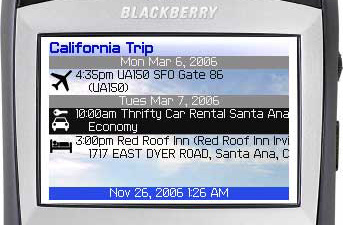 It's been about a year since the first version of the Skip client became available for testing. Targeting connected business travelers, and inspired by the interface metaphor of classic killer Blackberry apps like email, the Skip Blackberry client was heavy on text and light on visual sophistication.
As Blackberry users migrated to the high-density color devices like the 87xx and now the Pearl, Skip started looking a lot like opening Notepad on Windows Vista. But the 1.0 release suffered from the curse of being good enough. No major bug was ever reported for the Blackberry client, and the biggest usability problem by far turned out to be folks having trouble keying in their id and password on the device (not just SureType -- even QWERTY folks have had a lot of trouble, strangely enough).
Meanwhile, 2006 turned out to be a busy year for Skip's 1.5-FTE engineering division: to get the ball rolling we needed to deliver the core Skip server app, minimal web UI, travel industry integration, Java phone client (twice), Plam/Treo client (twice), Windows Mobile (it's in test, so try it now with this OTA install; additional bits you might need install OTA from here and here)... and the Blackberry client never got a proper polishing because it was just good enough never to get to top of the "urgent" list.
So I'm glad to finally offer this substantially touched up Blackberry client to all of our loyal early adopters. Most of the changes are small bug fixes, ergonomics improvements, and UI features which will be self-explanatory to readers of this blog. The only non-obvious change is a power-user mechanism that lets you use the same client to work with a production (www.goskip.com) or test system (peridot.goskip.com) account: in the username field, simply prepend "test!" to your email address (e.g. instead of foo@bar.com, test!foo@bar.com), and the client will operate with the test system.
You may notice some new UI features (like the icons) will only appear via the test server for now, as we'll be doing some additional testing before moving the server code changes into production. ETA is probably a week. Also, the first time the client syncs, it will load up the icons into its local cache, so that first sync may take a little longer than usual, especially over EDGE.
Let me know what you think, and thanks for your patience this, er, um, whole year.
Thursday, November 09, 2006
Security Questions Considered Harmful
I went to sign on to the citibank site today, and before I could complete the sign-on, I was presented with the following required step:
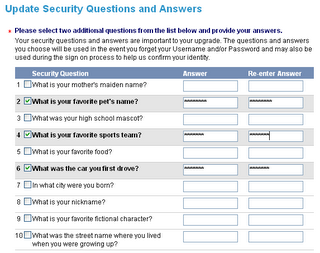
This whole approach is just so darned awful.
This data isn't secret. Some is public record, like where I was born. Other things, like my favorite pet's name, are not pieces of data one normally protects. It's much easier to amass a collection of unprotected facts, and use those to pose as someone, than to compromise an actual password, an encryption scheme, etc. Moreover, most of these questions are used by many sites for the same purpose. So if I know someone's nickname, street address growing up, city of birth, mother's maiden name -- all readily available in the U.S. -- I'm that person on a lot of websites.
Personally, I use Mr. Schneier's approach of typing in random gibberish, thereby protecting myself at the cost of some convenience if I do lose my password.
While I'm on the topic -- and I'm sure someone has written authoritatively on it before, but nevertheless ... -- I am surprised how rarely people realize that their unprotected email account is the weakest link for all of their "secure" online activity.
Many sites (including Skip) email a new password to a user upon request. The gmail account that they stay logged in to, or log in to from a questionable computer in a hotel lobby, thinking, "My life is so boring, hey if someone wants to read my gmail, let them" ... or a business email account accessed on the road in the clear ... these become the easy way to get passwords.
There's nothing inherently wrong about using email to do a password reset (reset -- that means only a temporary password is sent via email; the user must then change it to a more protected one). Folks just need to realize that the email account -- if it is registered with sites that send passwords -- needs to be protected. Complex password, routine changes, all that...
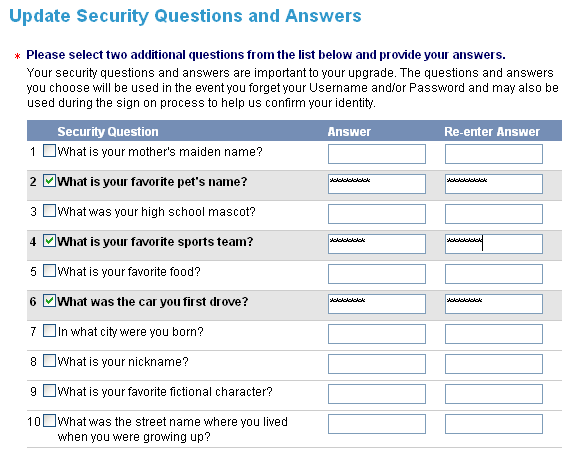
This data isn't secret. Some is public record, like where I was born. Other things, like my favorite pet's name, are not pieces of data one normally protects. It's much easier to amass a collection of unprotected facts, and use those to pose as someone, than to compromise an actual password, an encryption scheme, etc. Moreover, most of these questions are used by many sites for the same purpose. So if I know someone's nickname, street address growing up, city of birth, mother's maiden name -- all readily available in the U.S. -- I'm that person on a lot of websites.
Personally, I use Mr. Schneier's approach of typing in random gibberish, thereby protecting myself at the cost of some convenience if I do lose my password.
While I'm on the topic -- and I'm sure someone has written authoritatively on it before, but nevertheless ... -- I am surprised how rarely people realize that their unprotected email account is the weakest link for all of their "secure" online activity.
Many sites (including Skip) email a new password to a user upon request. The gmail account that they stay logged in to, or log in to from a questionable computer in a hotel lobby, thinking, "My life is so boring, hey if someone wants to read my gmail, let them" ... or a business email account accessed on the road in the clear ... these become the easy way to get passwords.
There's nothing inherently wrong about using email to do a password reset (reset -- that means only a temporary password is sent via email; the user must then change it to a more protected one). Folks just need to realize that the email account -- if it is registered with sites that send passwords -- needs to be protected. Complex password, routine changes, all that...
Wednesday, November 08, 2006
The Transactional Web
Ok, maybe a double-Z-list blog like this one ought not to start coining phrases.
On the other hand, I started thinking a little about the taxonomy of the (programmable | read-write | 2.0) web.
Three categories came to mind right away:
Other kinds of apps can be "transaction mashup apps" of course -- I can imagine a travel web site that uses airline seat change APIs together with, say, SeatGuru, to automatically get your family the combination of seats you want to sit in.
But to do that, and all sorts of other amazing things, more "transactional APIs" need to be opened up beyond the B2B world they're trapped in now. Companies -- and old economy companies in particular -- have been hesitant to open up these services as transactional APIs to the general public. There are some financial and security concerns, but they are not insurmountable as PayPal's successful payment API has shown.
What we need now is for folks like United Airlines to offer the same things via API that it has already put onto its web site (check in, cancel, standby, upgrade, seat change, flight change, status). Each web check-in helps the airline, and saves it money; the service should be published as widely as possible.
OpenTable blazed an early path with web-service-standards-as-B2B-infrastructure. But, hey, there are some great apps in the heads of people outside their small group of strategic partners.
Web 2.0 has shown if nothing else that there are more good ideas out there for what can be done with a data set than there are in here. And that the value of the data often increases the more freely it can be used by other applications in unexpected ways. I'm suggesting that the notion of a web-service-accessible data set be expanded to include the real-time seat map of an aircraft, the reservation book at a restaurant, the transaction history and current status of a Visa account, a doctor's appointment schedule ...
All the hard work for this stuff has already been done. When this switch finally gets flipped on, you're gonna see some real fireworks.
On the other hand, I started thinking a little about the taxonomy of the (programmable | read-write | 2.0) web.
Three categories came to mind right away:
- Classic mashups take two or more sources comprising different kinds of data, and combine them in a new UI or tool. This group includes things like HousingMaps (housing from craigslist + Google Maps), or BroadwayZone, which pulls in show info, hotels, transportation, etc., and uses Google Maps to provide a substrate and a UI for working with all of this data.
- Agent apps take multiple sources of related data, and bring them together to perform an action on behalf of a user. Some are goal-seeking agents, which search a wide space and narrow it down to something tractable based on a heuristic like minimizing a price. Kayak, which interacts with a huge number of travel websites and vendors, and Ugenie, which searches e-commerce sites, are agent apps.
- Proxy apps take one or more sources of data and bring it into a new context. 411Sync's Kayak queries use Kayak's own API to get raw data that can be formatted for the SMS service. This category also includes RSS (client) widgets, and mobile smart clients like Abidia (mobile auction), Mobio (movies) and, yes, Skip.
Other kinds of apps can be "transaction mashup apps" of course -- I can imagine a travel web site that uses airline seat change APIs together with, say, SeatGuru, to automatically get your family the combination of seats you want to sit in.
But to do that, and all sorts of other amazing things, more "transactional APIs" need to be opened up beyond the B2B world they're trapped in now. Companies -- and old economy companies in particular -- have been hesitant to open up these services as transactional APIs to the general public. There are some financial and security concerns, but they are not insurmountable as PayPal's successful payment API has shown.
What we need now is for folks like United Airlines to offer the same things via API that it has already put onto its web site (check in, cancel, standby, upgrade, seat change, flight change, status). Each web check-in helps the airline, and saves it money; the service should be published as widely as possible.
OpenTable blazed an early path with web-service-standards-as-B2B-infrastructure. But, hey, there are some great apps in the heads of people outside their small group of strategic partners.
Web 2.0 has shown if nothing else that there are more good ideas out there for what can be done with a data set than there are in here. And that the value of the data often increases the more freely it can be used by other applications in unexpected ways. I'm suggesting that the notion of a web-service-accessible data set be expanded to include the real-time seat map of an aircraft, the reservation book at a restaurant, the transaction history and current status of a Visa account, a doctor's appointment schedule ...
All the hard work for this stuff has already been done. When this switch finally gets flipped on, you're gonna see some real fireworks.
Tuesday, October 24, 2006
More API ... Build Your Own Interaction
An updated API is now available that starts letting anyone bring the pieces together to create mobile interactions. As before, the web service API is on the test server at https://peridot.goskip.com/skip.asmx and you can get a dev key by emailing me. The secure connection which was originally optional, is now required.
The API adds three new operations. Two of them ("MemberExists" and "CreateAccount") can be used to programmatically create new Skip accounts. Why would you want to do this? Suppose you had, say, a site oriented around a conference. You could give users an option to add conference events to their Skip account... and if they don't have a Skip account, but you have their email addresses, you could automatically generate a Skip account for them and insert the new activities.
But here's where it gets really fun: suppose you want to create interactions for these users, meaning real clickable menu items on their mobile device, associated with the conference activities you've just created for them. We've implemented a system that lets you do this in the easiest possible way. Using the "PublishAction" API, you can specify a display name (what shows up on the mobile device menu) and a URL that Skip will call back when the person clicks the item.
Technically, Skip will issue a HTTP GET to the URL you specify, will append ?user=xxx or &user=xxx as appropriate, where xxx is the user's email address, and whatever text you return from the GET (probably best to keep it short!) will become the "result" document from the user's Skip action invocation. When you call PublishAction, the API returns a bind key (a GUID) that you insert into the Publisher Data field of any item you create and that you want to feature your new menu item. The syntax is [bind:xxx] where xxx is the bind key. You can include more than one action on an item as well.
So here's a quick example. You're organizing this conference, and you want to offer your users event data through Skip. In addition, for conference keynote sessions you want to offer a quick "Thumbs Up" or "Thumbs Down" rating menu item. First, create the Thumbs Up and Thumbs Down actions, with as much specificity as you like (e.g., different URLs per keynote). Let's say you publish Thumbs Up, asking for a callback at http://www.tempuri.org/rating.ashx?keynote=monday
You then create the Monday keynote event for your users, and pass the bind key expression in the publisher data. When the user views the keynote event, she will now be offered a clickable menu item "Thumbs Up" -- and if she clicks it, Skip will make a call to http://www.tempuri.org/rating.ashx?keynote=monday&user=jane@janedoe.org in real time.
Where you go from here is up to you, but the possibilities are huge -- these callbacks are versatile enough that with a little creativity you can use them for restaurant reservations, ordering food, meetings, conferences ... they are pretty much a generic mobile front end for any one-click simple transaction that you might currently make available via the web.
Two final notes...
First, these APIs will continue to expand, allowing you to update items you've published in real time, and allowing you to create more complex interactive menu items with "wizard" type workflows and graphical elements. We already use these techniques at Skip for travel industry transactions like airline check in, and we want to make them available for general use.
Second, you might have read this far and are thinking "This is news? I publish a label and a URL, a user clicks something and your system issues a HTTP GET to the URL and returns a document ... isn't this called the web, and the technique is like 15 years old?" If you're asking this questions, then the answer is "Yes, exactly."
The API adds three new operations. Two of them ("MemberExists" and "CreateAccount") can be used to programmatically create new Skip accounts. Why would you want to do this? Suppose you had, say, a site oriented around a conference. You could give users an option to add conference events to their Skip account... and if they don't have a Skip account, but you have their email addresses, you could automatically generate a Skip account for them and insert the new activities.
But here's where it gets really fun: suppose you want to create interactions for these users, meaning real clickable menu items on their mobile device, associated with the conference activities you've just created for them. We've implemented a system that lets you do this in the easiest possible way. Using the "PublishAction" API, you can specify a display name (what shows up on the mobile device menu) and a URL that Skip will call back when the person clicks the item.
Technically, Skip will issue a HTTP GET to the URL you specify, will append ?user=xxx or &user=xxx as appropriate, where xxx is the user's email address, and whatever text you return from the GET (probably best to keep it short!) will become the "result" document from the user's Skip action invocation. When you call PublishAction, the API returns a bind key (a GUID) that you insert into the Publisher Data field of any item you create and that you want to feature your new menu item. The syntax is [bind:xxx] where xxx is the bind key. You can include more than one action on an item as well.
So here's a quick example. You're organizing this conference, and you want to offer your users event data through Skip. In addition, for conference keynote sessions you want to offer a quick "Thumbs Up" or "Thumbs Down" rating menu item. First, create the Thumbs Up and Thumbs Down actions, with as much specificity as you like (e.g., different URLs per keynote). Let's say you publish Thumbs Up, asking for a callback at http://www.tempuri.org/rating.ashx?keynote=monday
You then create the Monday keynote event for your users, and pass the bind key expression in the publisher data. When the user views the keynote event, she will now be offered a clickable menu item "Thumbs Up" -- and if she clicks it, Skip will make a call to http://www.tempuri.org/rating.ashx?keynote=monday&user=jane@janedoe.org in real time.
Where you go from here is up to you, but the possibilities are huge -- these callbacks are versatile enough that with a little creativity you can use them for restaurant reservations, ordering food, meetings, conferences ... they are pretty much a generic mobile front end for any one-click simple transaction that you might currently make available via the web.
Two final notes...
First, these APIs will continue to expand, allowing you to update items you've published in real time, and allowing you to create more complex interactive menu items with "wizard" type workflows and graphical elements. We already use these techniques at Skip for travel industry transactions like airline check in, and we want to make them available for general use.
Second, you might have read this far and are thinking "This is news? I publish a label and a URL, a user clicks something and your system issues a HTTP GET to the URL and returns a document ... isn't this called the web, and the technique is like 15 years old?" If you're asking this questions, then the answer is "Yes, exactly."
Friday, September 22, 2006
Windows and Linux Avoided a Big Java Mistake
As we wind down toward releasing our first dedicated Windows Mobile Skip client, I reflected on how easy it was to port the core logic from a Windows desktop test implementation. I compared this to a time when I wanted to port a modest J2SE library (which did not require any "fancy" APIs) to J2ME. And to another time when I needed a similar port for a Linux library.
It seems silly if not dumb to have to say this, but the fact that the Windows APIs for mobile are so similar to the full-on Win32 APIs (including the .net compact framework) makes it a no-brainer to convert many apps to run on mobile. Ditto with Linux, which of course represents an even purer case since "mobile Linux" is generally just another distro on another hardware platform.
So with Windows libraries, we can build, make a couple of changes, and off we go. Linux rules for porting, for obvious reasons, and ./configure; make; make install gets us "mobile."
Then there's J2SE to J2ME. Ouch. What were these guys thinking? Yes, things like this. And this.
But the bet was against Moore's law, and I believe it was not a smart bet for the platform. If Java has a future on devices, it'll be J2SE aka "Java SE Embedded"
It seems silly if not dumb to have to say this, but the fact that the Windows APIs for mobile are so similar to the full-on Win32 APIs (including the .net compact framework) makes it a no-brainer to convert many apps to run on mobile. Ditto with Linux, which of course represents an even purer case since "mobile Linux" is generally just another distro on another hardware platform.
So with Windows libraries, we can build, make a couple of changes, and off we go. Linux rules for porting, for obvious reasons, and ./configure; make; make install gets us "mobile."
Then there's J2SE to J2ME. Ouch. What were these guys thinking? Yes, things like this. And this.
But the bet was against Moore's law, and I believe it was not a smart bet for the platform. If Java has a future on devices, it'll be J2SE aka "Java SE Embedded"
Monday, September 11, 2006
Try Skip's First Public API
Skip's first public API is live on our test server. Part of our "keep it real" philosophy involves allowing public access to our test server almost all of the time, where interested parties can see and play with things we haven't quite finished.
The web service is located at https://peridot.goskip.com/skip.asmx, and opening the link in a browser provides the .net-generated descriptive and sample data for each operation, as well as a link to the WSDL.
Email me to get a free developer key, which is a string you pass in the devkey field.
The member field is the email address (Skip login) of the Skip member in whose itinerary you wish to create an item. publisherdata is the initial descriptive text corresponding to an item (which appears in the "annotation" box on the web). In the final release, this data will have its own independent field, which you will be able to update via the item handle that is returned from the Create operations.
Ignore the groupkey field for now, as it is not implemented yet -- but it will be used in a final release to allow you to associate multiple items so that the end user can move or manage them together as a group.
For flight segment items, the record locator and pax names are optional, but must be present if you want to enable the end user to do a one-click check-in via his mobile device.
These operations only affect accounts on the test server (peridot.goskip.com), not the production www.goskip.com site. The test server also hosts versions of the mobile client which run against test, if you would like to play with the full end-to-end travel publishing and travel consuming experience.
The web service is located at https://peridot.goskip.com/skip.asmx, and opening the link in a browser provides the .net-generated descriptive and sample data for each operation, as well as a link to the WSDL.
Email me to get a free developer key, which is a string you pass in the devkey field.
The member field is the email address (Skip login) of the Skip member in whose itinerary you wish to create an item. publisherdata is the initial descriptive text corresponding to an item (which appears in the "annotation" box on the web). In the final release, this data will have its own independent field, which you will be able to update via the item handle that is returned from the Create operations.
Ignore the groupkey field for now, as it is not implemented yet -- but it will be used in a final release to allow you to associate multiple items so that the end user can move or manage them together as a group.
For flight segment items, the record locator and pax names are optional, but must be present if you want to enable the end user to do a one-click check-in via his mobile device.
These operations only affect accounts on the test server (peridot.goskip.com), not the production www.goskip.com site. The test server also hosts versions of the mobile client which run against test, if you would like to play with the full end-to-end travel publishing and travel consuming experience.
Thursday, September 07, 2006
What Exactly are you Testing Anyway?
Static/dynamic language debates continue ... spurred on by the continued success of LAMP and RoR. These discussions often evolve into an admission that the real issue is "What is being tested?, What is doing the testing?, and When?". For example, Bruce Eckel (a C++ and Java guru among other things) wrote a canonical post in 2003 asserting that dynamic languages seemed to him to offer greater programmer productivity, and although certain things were not being checked before runtime, they were in any case being checked. Cf. the whole RuntimeException and strongly typed exception debate in the Java world.
The corollary to this conclusion of course is that you don't want your users finding your bugs at runtime, so something of a test-driven or at least strongly test-supported approach is necessary. Testing and TDD are great. Just as great as compile-time checking. The problem is that the two are not testing the same things, or with the same coverage.
The specifics: static compile time checking typically covers 99% of the code for most applications (it normally excludes casts, dynamically generated code, and reflection among other things). From a user/feature point of view, it covers, well, 0%. So it covers a whole lot of things that are helpful, but not immediately relevant to the feature set.
Now look at a solid TDD-inspired test suite. Assume it adheres to best practices meaning coverage of all (functional) features (the core of TDD), multiple failure cases, non-trivial tests, etc. So we have coverage of 100% of features (again I'm excluding non-functional requirements like security, performance, design for the time being). And it will, through sheer exercise of code, verify a significant percentage of the formal code correctness, including type compatibility.
At this point, the problem and the solution are obvious (if hard to implement). PROBLEM: The test engine, including test suites, UI test runners like Selenium, components that generate random input data or events, load testing facilities, security analysis probes, etc. are still limited to producing an a posteriori analysis of a small set of cases. But these are only the positive cases (where positive includes success and defined failure modes) plus a tiny fraction of the negative (unspecified failure) cases. Type checking in strongly-typed languages provides a comforting a priori data set over nearly all cases.
SOLUTION: We need to create better analysis tools for all languages. We need a big step beyond the formal syntax checking, type checking, and lint analysis of code. Some more sophisticated approaches are going to be necessary. At the minimum, it would likely involve recursive runtime use (GUI design tools have "cheated" like this for years), dictionaries of data types, ranges, precision, etc., and a probability engine that can handle breaking up workflows into blocks in order to keep permutations within the compute capability of the hardware, and then recombining them along with a risk analysis of what's thereby been left out.
A lot of work has already gone into finding the boundaries of this problem, especially in academia and where languages (e.g. Scheme) with heavy academic use are concerned. Traditional static analysis and more importantly some human user hints will need to set up the constraints, so that the testing does not devolve into "testing any string that can be passed to eval"
The corollary to this conclusion of course is that you don't want your users finding your bugs at runtime, so something of a test-driven or at least strongly test-supported approach is necessary. Testing and TDD are great. Just as great as compile-time checking. The problem is that the two are not testing the same things, or with the same coverage.
The specifics: static compile time checking typically covers 99% of the code for most applications (it normally excludes casts, dynamically generated code, and reflection among other things). From a user/feature point of view, it covers, well, 0%. So it covers a whole lot of things that are helpful, but not immediately relevant to the feature set.
Now look at a solid TDD-inspired test suite. Assume it adheres to best practices meaning coverage of all (functional) features (the core of TDD), multiple failure cases, non-trivial tests, etc. So we have coverage of 100% of features (again I'm excluding non-functional requirements like security, performance, design for the time being). And it will, through sheer exercise of code, verify a significant percentage of the formal code correctness, including type compatibility.
At this point, the problem and the solution are obvious (if hard to implement). PROBLEM: The test engine, including test suites, UI test runners like Selenium, components that generate random input data or events, load testing facilities, security analysis probes, etc. are still limited to producing an a posteriori analysis of a small set of cases. But these are only the positive cases (where positive includes success and defined failure modes) plus a tiny fraction of the negative (unspecified failure) cases. Type checking in strongly-typed languages provides a comforting a priori data set over nearly all cases.
SOLUTION: We need to create better analysis tools for all languages. We need a big step beyond the formal syntax checking, type checking, and lint analysis of code. Some more sophisticated approaches are going to be necessary. At the minimum, it would likely involve recursive runtime use (GUI design tools have "cheated" like this for years), dictionaries of data types, ranges, precision, etc., and a probability engine that can handle breaking up workflows into blocks in order to keep permutations within the compute capability of the hardware, and then recombining them along with a risk analysis of what's thereby been left out.
A lot of work has already gone into finding the boundaries of this problem, especially in academia and where languages (e.g. Scheme) with heavy academic use are concerned. Traditional static analysis and more importantly some human user hints will need to set up the constraints, so that the testing does not devolve into "testing any string that can be passed to eval"
Subscribe to:
Posts (Atom)